Write a metric document
How to write your metrics down so Tattva stores your query exactly, with the right inputs, settlement and families.
A metric document is where you tell Tattva how your team calculates each number. On this page you learn how to write one: one section per metric, the query you actually run, which values change with the question, settlement, adjusted numbers, references between metrics and families. A complete example document is at the end, followed by a checklist. After you accept what Tattva proposes from it, answers compute these metrics from your query, not from the model's guess.
What happens to your document
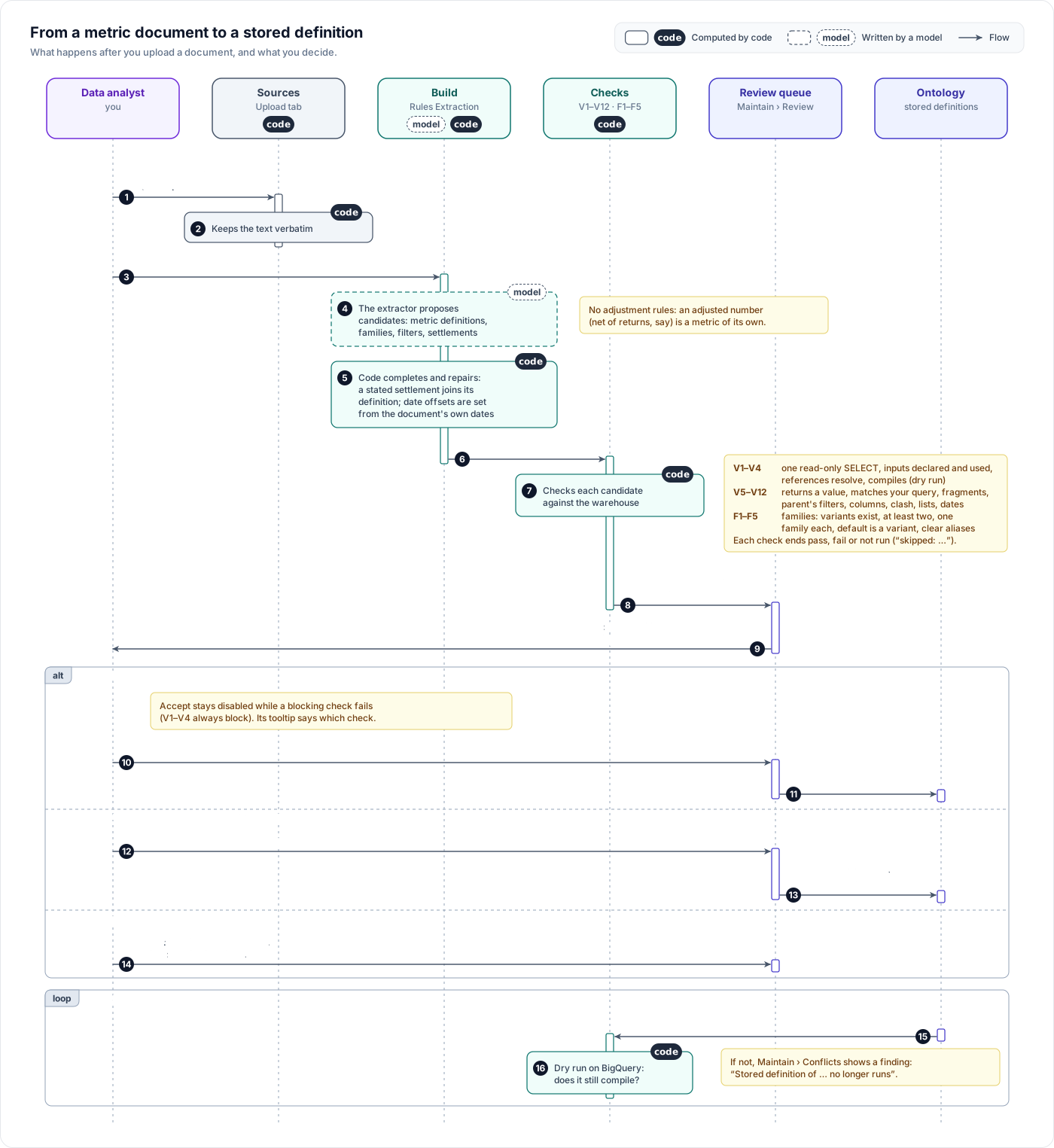
- You upload the document as .md or .txt on Sources › Upload. Its text is kept word for word.
- The next build reads it in the Rules Extraction phase: a small document in one go, a large one one section at a time with the whole document as context, then the text outside those sections. For each metric, it proposes a stored definition: your query kept whole, with the dates and the values that change with the question turned into inputs (also called parameters). It also proposes families, filters and settlements.
- Code takes each metric's query from its own section and holds the definition to it: apart from its inputs, the definition must be your query as written. When the extractor's SQL differs anyway (a line dropped or rewritten), code rebuilds the definition from your query with the same inputs and says so on the card; when it cannot tell which input a value belongs to, the card names where the two differ. Code also repairs what it can prove from your text, such as a date offset, the value your query used for an input, or an input the query never uses, and says so on the card.
- Code runs checks V1–V12 against BigQuery, including running your query and the definition side by side.
- Each proposal waits in Maintain › Review. When you accept it, it becomes the metric's definition. Answers, trackers and Try it all run it.
What a stored definition is made of
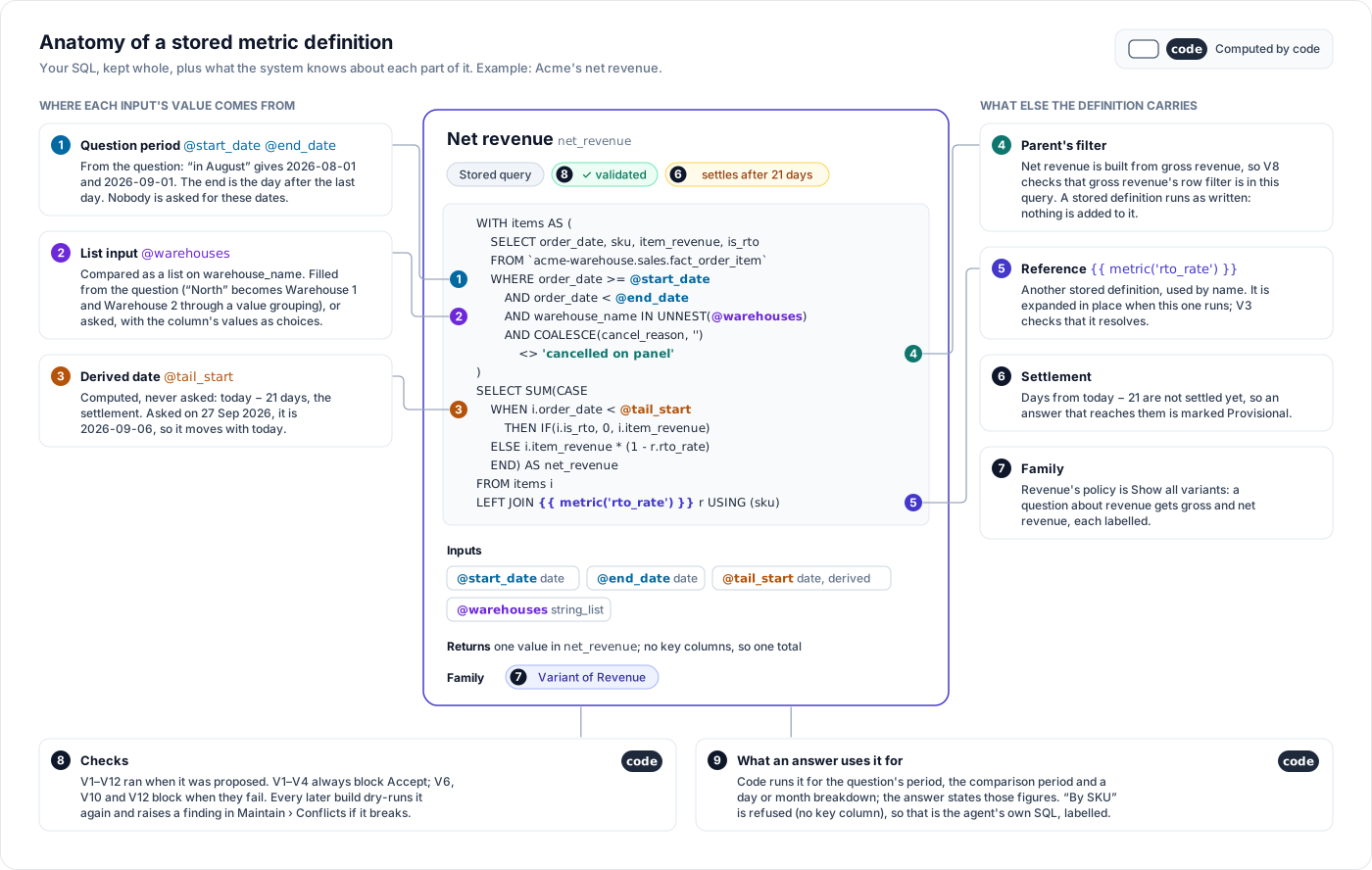
| Part | What it is | Where it comes from in your document |
|---|---|---|
| SQL | Your query, with inputs written as @name | The query in the section |
| Value column | The column that holds the metric's value | The AS net_revenue you name |
| Key columns | Columns that make one row per something, shown as "per sku" | A GROUP BY in your query |
| Inputs | Each value a question fills in, and where it comes from | The dates and the values you say change with the question |
| Settlement | Days after which the figure stops changing | "RTO takes 21 days to show up" |
| Uses / Built from | Other metrics this one refers to or is built from | "from the RTO rate above", "net revenue is gross revenue less RTO" |
| Family | The shared word this metric is a variant of | "There are two revenues…" |
| Validation | The result of checks V1–V12 | Run by code when the document is read |
1. One metric per section
Give each metric its own heading, its name, one or two sentences on what it means, and its query. Tattva proposes one definition per section and quotes your section back to you on the review card. Two metrics in one paragraph produce proposals that are hard to check.
Make the heading the metric's name (## Net revenue) and put its query in one sql code block under it. When the extractor does not copy your query, code takes it from that block and the card says "The query was taken from the document's … section". When a read proposes no definition for a section with a complete query, Tattva reads that section once more on its own and asks for its definition. If that read also misses it, the build reports "the section has a query but no metric definition was proposed".
How a document is read depends on its size. The extractor writes its proposals in answers of at most 16,000 tokens, and a definition costs about one token per character of its query plus 1,000–3,000 for the rest. Tattva adds up each query's length plus 1,000 per metric: up to 12,800, the whole document is read in one answer, and a metric that uses another of the document's metrics refers to it by name. Above that, each section is read in its own answer, and a metric is less likely to refer to another one by name: it may repeat the other metric's logic instead, which V6 still checks against your query. Keep each section's query under about 12,000 characters. A longer query is cut off and its metric is not read: the build reports "the extractor's answer for section “…” reached its output limit (16,000 tokens) and was cut off", with the query's length. Reading again gives the same result. Split the query into smaller metrics, or make a shared part its own metric and use it by name (see Refer to another metric by name). The length of your prose does not matter.
Use the same name everywhere. The heading becomes the metric's identifier: "Net revenue" becomes net_revenue, even in a document titled "Acme net revenue". When the extractor picks another name, the card says so, for example "Named acme_net_revenue instead of the section heading “Net revenue” (net_revenue)". When a metric with the heading's name already exists, the definition takes that name and replaces it after you accept, and the card says "Named net_revenue after its section “Net revenue”, the existing metric it replaces".
Keep every condition of the metric inside its query. A condition the extractor reads as a filter rule without a filter, such as "only days before the first unsettled day", is not proposed on its own: it shows on the definition's card as "Filter rule … names no filter, so it is not proposed on its own — check this query applies it".
Before you pick a name, look it up on Make › Data: the Domain Glossary on the Domain sub-tab, and the Metrics table on the Data sub-tab. Neither has a search box; use your browser's find (Ctrl+F or ⌘F) with the name and the slug. What you should do depends on what is already there:
| A metric with that name is… | What happens | What to do |
|---|---|---|
| not there | A new metric | Nothing |
| a stored definition your project accepted | Your section replaces it (V10 reads Replaces the accepted definition) | Use the same name on purpose. See Replace a definition. |
| a formula metric the build generated | V10 blocks Accept: "already exists with a different definition — retire or rename it first" | Delete the formula metric first (below), or give yours a different name |
| inherited from the workspace | V10 blocks Accept in the same way | Give yours a different name |
To delete a generated formula metric: on Make › Data › Data, hover over its row in Metrics, click Delete, and click Remove in the dialog. A later build does not create it again: a deleted metric is remembered by name and by formula. Delete it before the build that reads your document. If the document was already read and its card is blocked, reject the card, delete the formula metric, and upload the document again as a new file; each upload is read afresh.
2. A complete query, or prose
Best: the complete query you actually run, with the dates filled in.
-- Gross revenue, last 30 days as of 26 Sep 2026
SELECT SUM(item_revenue_inc_tax) AS gross_revenue
FROM `acme-warehouse.sales.fact_order_item`
WHERE COALESCE(cancellation_reason, '') <> 'cancelled on panel'
  AND DATE(order_date) >= '2026-08-27'
  AND DATE(order_date) < '2026-09-26'
When the document has a complete query, Tattva runs your query and its stored definition with your dates and compares the results row by row (check V6). If they match, the stored definition computes what you compute.
Also accepted: prose, or SQL pieces with prose.
Gross revenue is item revenue including tax, leaving out items cancelled on the panel:
SUM(item_revenue_inc_tax)whereCOALESCE(cancellation_reason, '') <> 'cancelled on panel'.
Here Tattva writes the query itself. There is nothing to compare it with, so V6 does not run and only the pieces you quoted are checked (V7). A definition written from prose alone is marked Drafted from prose on its row in Make and on its Definition tab. Read the SQL on the card carefully before you accept.
Tips:
- Name the output column (
AS gross_revenue). That column is the metric's value. A query that returns one row per SKU is fine: the SKU column becomes a key column, and answers can break the metric down by SKU. A question that names one SKU then gets that SKU's row. For that, compute the key from one column, such asIFNULL(foi.item_sku_code_uc, 'unknown') AS sku: a question filtering onitem_sku_code_ucthen finds theskukey. In aCASE, only the columns itsTHENandELSEresults return count, not the ones itsWHENconditions test. A key whose value comes from two columns is matched only by its own name. - Make each query run on its own. A query written as
-- same CTEs as abovecannot run by itself, so V6 reports "the document's query does not run on its own". Repeat the CTEs if you want the comparison. - Say the day the queries are written as of, for example "All queries are written as of 4 October 2026". Tattva also reads "as of 2026-10-04" and "Data as on 04 Oct 2026". It computes settlement dates from that day and checks them against it (V12). A section that states its own day uses that day. Without a stated day, Tattva uses the latest end date of the document's reporting periods. When the stated day is not that end date, the card says so, for example "As of 2026-10-04, the day the document says its queries were written — not 2026-10-01, where its latest period ends".
- Copy every compared value exactly as it is stored.
'cancelled on panel','RTO'and'Warehouse 1'are matched character for character, case included. Check each one in the BigQuery console before you write it, for exampleSELECT cancellation_reason, COUNT(*) FROM … WHERE LOWER(cancellation_reason) LIKE '%panel%' GROUP BY 1. Tattva cannot run a query for you before you accept a definition, so use BigQuery for this.
3. Which values become inputs
Tattva turns some values in your query into inputs that each question fills in. Everything else stays exactly as you wrote it.
| In your query | Becomes | Filled in by |
|---|---|---|
The period's dates: >= '2026-08-27' and < '2026-09-26' | Two inputs, such as @start and @end. The end is the day after the period's last day. | The question's period: "last 30 days", "August" |
| A date a fixed number of days from the period, or from the start of the unsettled days | A derived date (sections 4 and 5) | Code |
| A value that changes with the question: a SKU, a list of warehouses | An input on that column. A list is compared with warehouse_name IN UNNEST(@warehouses). | A value named in the question, a grouped label, or the user's answer |
Fixed business logic: 'cancelled on panel', 'RTO', >= 200 | Stays as written | — |
Rules that matter:
- Each distinct date gets its own input. If two different dates are merged into one, the query's logic changes and V6 fails with "the document's query uses '…', which no parameter carries and the document does not state as a fixed date".
- State a fixed date in words next to the query. A date that is a business rule, not a period, stays in the query as written when your text says so, for example "Google attributed spend counts from 1 August 2025". The card's V6 line then names it: fixed date 2025-08-01 and your sentence. A date your text does not state that way must be an input.
DATE '2025-08-01','2025-08-01'andDATE(2025, 8, 1)are treated the same. - Say in the text which values change with the question. "The warehouses change with the question" or "the SKUs change with the question" is exactly what Tattva needs. A value that is not a date and that you do not mark stays fixed in the query.
- Re-uploading a document does not re-propose unchanged metrics. A metric whose query, inputs, value column and settlement are the same as the accepted definition gets no card; the build's Rules Extraction line counts it as "same as accepted".
- A value the question does not give is asked for. If someone asks for warehouse gross revenue without naming a warehouse, the answer stops and asks. When the column has known common values, the input is asked alone, one at a time, with those values as clickable choices, and the user can also type an answer. A value named in the question binds directly: in "cross-sell from SKU-A to SKU-B", SKU-A fills the source input and SKU-B the target. The Trail then shows where each value came from, such as "named in the question" or "you answered". See Inputs and groupings.
4. "N days after the period"
Some metrics look past the end of the period. A repeat rate does: a customer in the May cohort counts as repeating if they order again within 90 days. In the example document, the May 2026 cohort is >= '2026-05-01' AND < '2026-06-01', and the repeat-order scan ends at '2026-08-30'.
- The cohort is the question's period. "The May 2026 cohort" gives 2026-05-01 and 2026-06-01, so nobody is asked for these dates.
'2026-08-30'is the period's end plus 90 days (2026-06-01 + 90). It is computed from whichever cohort is asked about. The Parameters table says "the day after the period + 90 days".- Write the rule in words too ("within 90 days"). Tattva uses your literal dates to set the offset. If the extractor got it wrong, code corrects it from your dates and says so on the card, for example: "Derived date corrected: @scan_end is window_end + 90 days (the document used 2026-08-30); the extractor had 89". Check that note when you see it.
In answers: if the 90 days have not all passed yet, the figure is incomplete. The Trail shows "Incomplete: data needed until … does not exist yet — the figure will change.", and the answer must say so next to the figure.
5. Settlement
A metric whose value keeps changing after the fact, such as RTO, returns or refunds, has a settlement period. Say it as a number of days:
RTO takes 21 days to show up, so we only measure it on orders at least 21 days old.
- That sentence sets the metric to settle after 21 days. Be exact: "a couple of weeks" gives a low-confidence proposal, and a settlement with no number is not proposed at all.
- Dates defined by the settlement come from it, not from the question's period. In the example, written as of 26 Sep 2026, the first unsettled day is 26 Sep minus 21 days:
'2026-09-05'. "The 30 settled days before it" run from'2026-08-06'to'2026-09-05'. Both move with today. The Parameters table says "filled in by code: tail start" and "filled in by code: tail start − 30 days". - Keep one name per date across the document. If
rto_ratecalls the first unsettled day@tail_start, so shouldnet_revenue. - Your query decides how the unsettled days are handled. The example's net revenue takes out the RTO that actually happened on settled days, and each SKU's recent RTO rate on the unsettled days.
- A metric that counts every day the same way, such as gross revenue, has no settlement. "Last 30 days" is a reporting period, not a settlement.
- State the day the document is written as of, or include at least one metric with a reporting period. With neither, Tattva has no "as of" day and cannot check settlement dates: V12 shows "not run".
In answers: a figure whose period reaches into the last 21 days is provisional. The Trail shows "Provisional: days from 2026-09-05 are not settled yet.", and the answer must say so beside the figure. See Metrics in Make.
6. Adjusted numbers are metrics of their own
"Revenue net of RTO", "revenue after returns" and "AOV net of expected returns" are each their own metric, defined in full with their own query, like net_revenue in the example. There are no adjustment rules. A document that describes an adjustment gets the build warning "adjustments are no longer extracted — define the adjusted number as its own metric".
7. Refer to another metric by name
net_revenue takes off each SKU's RTO rate, and rto_rate is defined in the same document. The stored definition of net_revenue can refer to rto_rate by name instead of copying its logic: {{ metric('rto_rate') }}. You do not write that yourself; Tattva writes it.
- Use the other metric's exact name. "Each SKU's RTO rate (from the query above)" works because
rto_rateis a section of the same document. A reference that matches no metric in the document or already accepted fails V3. - Your query may repeat the logic inline. The example's net revenue computes the rate in its own CTEs. That is fine: V6 still compares its result with yours.
- Say what the referenced metric does not cover. "SKUs with no settled orders use the overall rate" stays in
net_revenue's own logic. - Say when a metric is built from another one. "Net revenue is gross revenue less RTO" marks
net_revenueas built fromgross_revenue. V8 then checks that gross revenue's row filter ('cancelled on panel') is in net revenue's query too.
8. Families and their policy
A family is one word that covers several metrics. Say that the word covers them, and say what to do when someone uses it.
| Your wording | Policy | What an answer does |
|---|---|---|
| "There are two revenues, gross and net, and people mean different ones. When someone asks for revenue without saying which, show gross and net revenue." | Show all variants | One labelled figure per variant |
| "There are three kinds of retention. Ask which one is meant." | Ask which one | Asks "Which retention do you mean?" with the variants as choices |
| "When someone says RTO rate without naming a SKU, they mean the overall rate. Mention that a per-SKU rate exists." | Use one by default and mention the others with their figures | Computes the default and, when the question asks for the family's value, each other variant that returns one total; names a per-SKU variant without a figure |
- If you do not say what to do, the policy is ask, at low confidence, so the card is flagged. Tattva never guesses "show all".
- Every variant must exist, either defined in the same document or already accepted (F1). A family needs at least two variants (F2).
- Aliases are the words people use for the family ("revenue", "sales"). Never use a variant's own name as an alias: "net revenue" means net revenue, not the family. Such an alias is dropped.
More, with example answers: Families.
9. Filters, for formula metrics
A stored definition runs as written. Filters are not applied to it, so put every exclusion a metric needs into its own query.
Filters are for metrics Tattva built from a formula rather than your query:
Cancelled items are never counted as revenue. Exclude any row where
cancellation_reasonis set.
Name the column. If you say which metric the filter applies to, the card shows "Applies to" that metric and accepting it attaches the filter there. See Metrics in Make.
An exclusion written inside a metric's own section, such as "It leaves out items cancelled on the panel", usually produces a reusable filter card too, often with no Applies to. When that exclusion is already in the metric's stored query, reject the filter card. Never accept two cards with the same slug.
10. Value groupings live in the product
One real-world name often has several spellings in the data: "Warehouse 1" may appear as WH1_NORTH and Warehouse 1 (old). You do not fix that in the document. Group the raw values once under a label in Ontology › Manage › Knowledge Graph, and every definition with a list input on that column understands the label. See Inputs and groupings.
11. Dashboards
You can declare a dashboard your team keeps in the same document. Give it a section of its own, with no query, and state its title, its link, the metrics it shows, the breakdowns it offers, the periods a viewer can pick, and how often it refreshes:
## Dashboard: Revenue by product

The team's Looker Studio report for the weekly review.

- Link: https://lookerstudio.google.com/reporting/abc123
- Shows: gross_revenue, net_revenue
- Broken down by: month
- Periods: month, any date range
- Refresh: daily at 9:00
The build turns it into a dashboard card in Review. Nothing is live until the card is accepted; accepting it adds the dashboard to Make › Dashboards, linked to the metrics it shows.
- Use the metrics' exact names. Each one must be defined in the same document or already accepted. A dashboard naming a metric that is neither is not proposed, and the build panel says why. A metric defined in the same document is accepted first.
- Name only breakdowns the metrics return: the key columns of their queries, or a period (day, week, month, quarter, year) when they take the question's period. Accept refuses any other, with the keys each metric returns.
- A link is required. A dashboard with no
https://link is not proposed.
See Dashboards for repeated questions.
A complete example
This document defines five metrics and one family for Acme, a D2C brand. It is written as of 26 September 2026. Copy its shape.
# Acme sales metrics

All queries are written as of 26 September 2026. They read
`acme-warehouse.sales.fact_order_item`, one row per order item.

## Gross revenue

Gross revenue is item revenue including tax. It leaves out items
cancelled on the panel. It counts every day the same way.

```sql
-- Gross revenue, last 30 days as of 26 Sep 2026
SELECT SUM(item_revenue_inc_tax) AS gross_revenue
FROM `acme-warehouse.sales.fact_order_item`
WHERE COALESCE(cancellation_reason, '') <> 'cancelled on panel'
  AND DATE(order_date) >= '2026-08-27'
  AND DATE(order_date) < '2026-09-26'
```

## Warehouse gross revenue

Gross revenue for the warehouses someone asks about. The warehouses
change with the question.

```sql
-- Warehouse gross revenue, Warehouse 1 and Warehouse 2, last 30 days
SELECT SUM(item_revenue_inc_tax) AS warehouse_gross_revenue
FROM `acme-warehouse.sales.fact_order_item`
WHERE COALESCE(cancellation_reason, '') <> 'cancelled on panel'
  AND warehouse_name IN ('Warehouse 1', 'Warehouse 2')
  AND DATE(order_date) >= '2026-08-27'
  AND DATE(order_date) < '2026-09-26'
```

## RTO rate

The share of items returned to origin (RTO), per SKU. RTO takes 21 days
to show up, so we only measure it on orders at least 21 days old: the
30 settled days before the first unsettled day. It does not depend on
the question's period.

```sql
-- RTO rate per SKU, the 30 settled days before 5 Sep 2026
SELECT sku,
       SAFE_DIVIDE(COUNTIF(shipment_status = 'RTO'), COUNT(*)) AS rto_rate
FROM `acme-warehouse.sales.fact_order_item`
WHERE COALESCE(cancellation_reason, '') <> 'cancelled on panel'
  AND DATE(order_date) >= '2026-08-06'
  AND DATE(order_date) < '2026-09-05'
GROUP BY sku
```

## Net revenue

Net revenue is gross revenue less RTO. On settled days we take out the
items that actually went RTO. On the last 21 days, which have not
settled, we take out each SKU's RTO rate (from the query above) as an
estimate. SKUs with no settled orders use the overall rate. Net revenue
settles after 21 days, like RTO.

```sql
-- Net revenue, last 30 days as of 26 Sep 2026
WITH items AS (
  SELECT DATE(order_date) AS day, sku,
         item_revenue_inc_tax AS revenue, shipment_status
  FROM `acme-warehouse.sales.fact_order_item`
  WHERE COALESCE(cancellation_reason, '') <> 'cancelled on panel'
    AND DATE(order_date) >= '2026-08-27'
    AND DATE(order_date) < '2026-09-26'
),
settled AS (
  SELECT sku, shipment_status
  FROM `acme-warehouse.sales.fact_order_item`
  WHERE COALESCE(cancellation_reason, '') <> 'cancelled on panel'
    AND DATE(order_date) >= '2026-08-06'
    AND DATE(order_date) < '2026-09-05'
),
sku_rate AS (
  SELECT sku, SAFE_DIVIDE(COUNTIF(shipment_status = 'RTO'), COUNT(*)) AS rate
  FROM settled
  GROUP BY sku
),
overall AS (
  SELECT SAFE_DIVIDE(COUNTIF(shipment_status = 'RTO'), COUNT(*)) AS rate
  FROM settled
)
SELECT SUM(
  CASE
    WHEN i.day < '2026-09-05' THEN IF(i.shipment_status = 'RTO', 0, i.revenue)
    ELSE i.revenue * (1 - COALESCE(r.rate, o.rate))
  END
) AS net_revenue
FROM items i
LEFT JOIN sku_rate r USING (sku)
CROSS JOIN overall o
```

## Revenue

There are two revenues, and people mean different ones: gross revenue
and net revenue. People say "revenue" or "sales". When someone asks for
revenue without saying which, show gross and net revenue.

## Repeat rate

The share of a month's new customers who order again within 90 days of
the end of that month. The cohort month changes with the question.

```sql
-- Repeat rate, May 2026 cohort, ordering again within 90 days
WITH first_orders AS (
  SELECT customer_id, MIN(DATE(order_date)) AS first_day
  FROM `acme-warehouse.sales.fact_order_item`
  WHERE COALESCE(cancellation_reason, '') <> 'cancelled on panel'
  GROUP BY customer_id
),
cohort AS (
  SELECT customer_id, first_day
  FROM first_orders
  WHERE first_day >= '2026-05-01' AND first_day < '2026-06-01'
),
repeaters AS (
  SELECT DISTINCT c.customer_id
  FROM cohort c
  JOIN `acme-warehouse.sales.fact_order_item` o
    ON o.customer_id = c.customer_id
   AND DATE(o.order_date) > c.first_day
   AND DATE(o.order_date) < '2026-08-30'
  WHERE COALESCE(o.cancellation_reason, '') <> 'cancelled on panel'
)
SELECT SAFE_DIVIDE((SELECT COUNT(*) FROM repeaters),
                   (SELECT COUNT(*) FROM cohort)) AS repeat_rate
```
What to expect in Maintain › Review from this document. The extractor is a model, so check each card rather than assume it matches this table.
| Section | Proposal | Inputs | Notes |
|---|---|---|---|
| Gross revenue | Stored definition gross_revenue | @start, @end from the question's period | No settlement |
| Warehouse gross revenue | Stored definition warehouse_gross_revenue | Period, plus a list input on warehouse_name | Asked for when the question names no warehouse |
| RTO rate | Stored definition rto_rate, per sku | Two dates filled in by code: tail start, and tail start − 30 days | Settles after 21 days |
| Net revenue | Stored definition net_revenue | Period, plus the same two settlement dates | Settles after 21 days. Uses rto_rate. Built from gross_revenue, so V8 checks the cancelled-on-panel filter. |
| Revenue | Family revenue with variants gross_revenue and net_revenue | — | Policy: show all variants. Said as "revenue", "sales". |
| Repeat rate | Stored definition repeat_rate | Period (the cohort month), plus the scan end: the day after the period + 90 days | Incomplete until the 90 days have passed |
Expect some extra cards as well:
reusable filtercards for the "leaves out items cancelled on the panel" sentences, often without Applies to. Every metric here already has that exclusion in its query, so reject them.entitycards with provenancedocument_nerfor things the text names, such as warehouses. They are not metric logic; accept the ones that are real business entities and reject the rest.
Check that your columns are populated for the periods you use
V9 only catches a column that is empty everywhere. A column can be full over all time and empty for the last 30 days. Run your query for a recent period in the BigQuery console before you upload, and check the spelling and case of every value you compare against.
Before you upload
- One section per metric, each with its name and meaning
- A complete query that runs on its own, where you have one
- The output column is named (
AS metric_name) - All queries written as of the same day, with the dates filled in
- The values that change with the question are said to change
- Every "N days after" rule is said in words as well as in dates
- Settlement stated as a number of days, where the value keeps changing
- At least one metric has a reporting period, so settlement dates can be checked
- Adjusted numbers are written as their own metrics
- A metric built from another says so, and uses the other's exact name
- Every family says which metrics it covers and what to do with the word
- The columns you use are populated for the periods you use them for
Upload it
Save the document as .md (easiest to review) or .txt.
Open Sources › Upload, click Upload more and pick the file. Wait until it is Ready.
Open Ontology and click Regenerate. Uploading a document does not raise the "Sources changed" banner, so start the build yourself.
When the build finishes, read any ⚠ lines under rules_extraction on the build panel. Each one names a metric that was not proposed and why.
Open Maintain › Review and review each card. See Review what Tattva proposes.
A document is read once
A later build skips a document that already produced proposals. When a read misses a section's definition, or a reply cannot be used, the build reads that part once more straight away; the other sections keep their cards. To have a document read again later, open its source on Sources, click Read again on next build, then Regenerate; the cards from earlier reads stay in the review history. To change a metric, write the corrected section in a new document with the same metric name. See Replace a definition and What a build changes.