Inputs and groupings
Where each input of a stored definition gets its value, how list inputs and value groupings work, and where common values come from.
A stored definition is your SQL, kept whole, with some values turned into inputs (parameters): the dates, and the values that change with the question, such as a SKU or a list of warehouses. Everything else stays exactly as you wrote it. This page explains how each input gets its value when someone asks a question, and what you can do to make that work well.
Where an input's value comes from
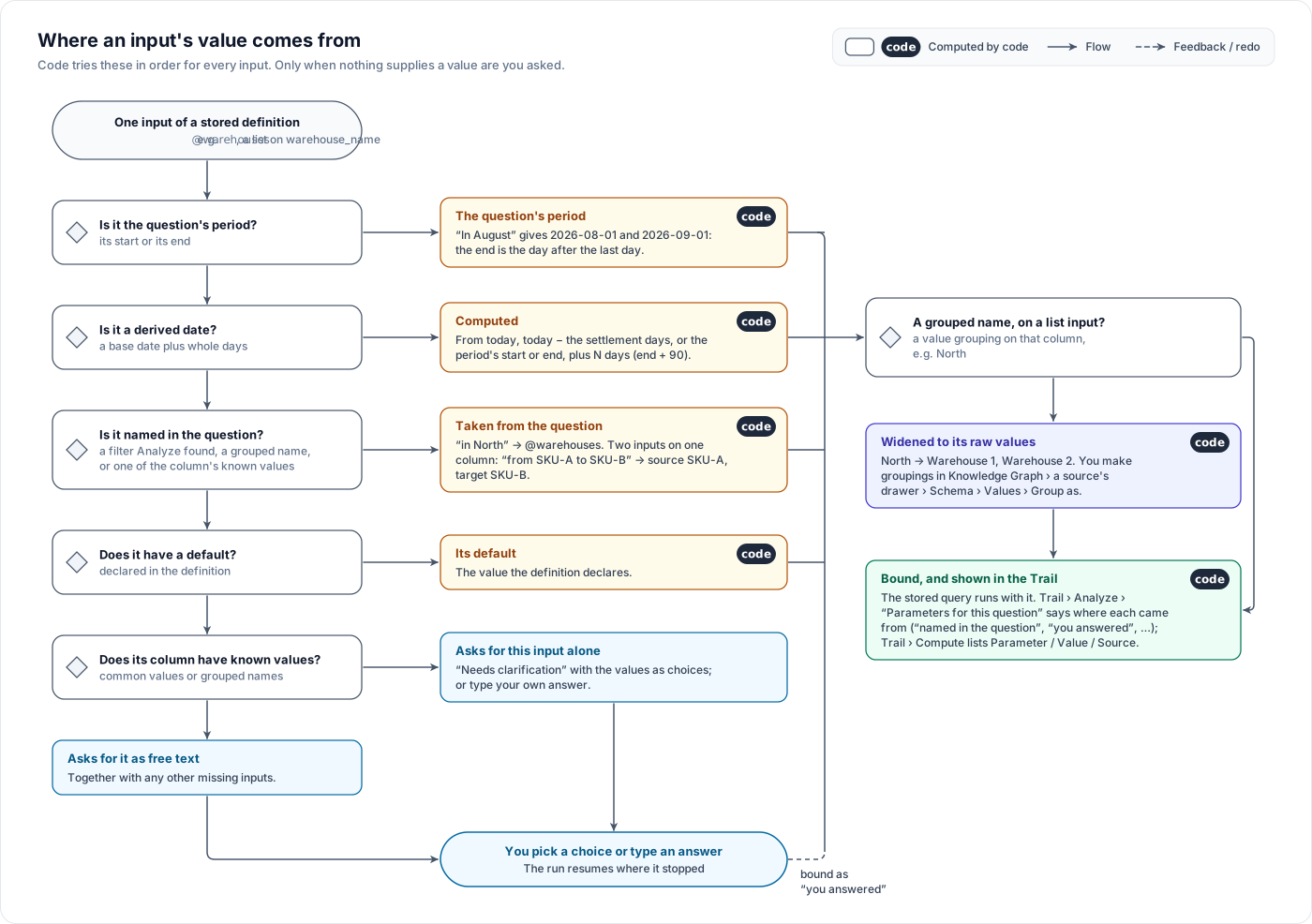
Every input is filled from one of these, and the Trail says which. Open the answer's Trail, then the Analyze card, then Parameters for this question; the Source column uses the words in the right-hand column below.
| Where the value comes from | Example | Source in the Trail |
|---|---|---|
The question's period. The start is the first day. The end is the day after the last day, so a query written >= @start AND < @end counts the whole period | "last 30 days", "August", "the May cohort" | the question's period (first day); the question's period (end — the day after its last day) |
| A derived date. Computed from the period or from today, never asked | "90 days after the period" → window end + 90 days; "today minus the settlement days" → settlement tail start (today − 21 days) | window end + 90 days, settlement tail start (today − 21 days), today … |
| A value named in the question. A known value of the column, or a grouping label, found in the question's words | "net revenue for SKU-A" | named in the question |
| A value the question states for an input. The agent reads it with the words that state it, and code keeps it only when those words are in the question, state that value, and are not the question's period (the 30 of "last 30 days" fills the period, never an input) | "66 day LTV" → window_days = 66 | from the question ("66 day") |
| A filter read from the question | "orders on the app channel" | from the question |
| Your answer to a clarification | You clicked SKU-B | you answered |
| The definition's default. Used when the question states no value. When the agent read a value that failed those checks, the Trail says why it was not taken | — | default; default (not taken from the question: …) |
From and to
Some metrics have two inputs on the same column: cross retention from one SKU to another has a source SKU and a target SKU. The word before the value places it. "from SKU-A" fills the source input and "to SKU-B" (or "into SKU-B") fills the target. Name the inputs so this is clear: source_sku / target_sku, or first_sku / repeat_sku.
When nothing supplies a value: clarification
If an input still has no value, the answer stops and shows a Needs clarification card.
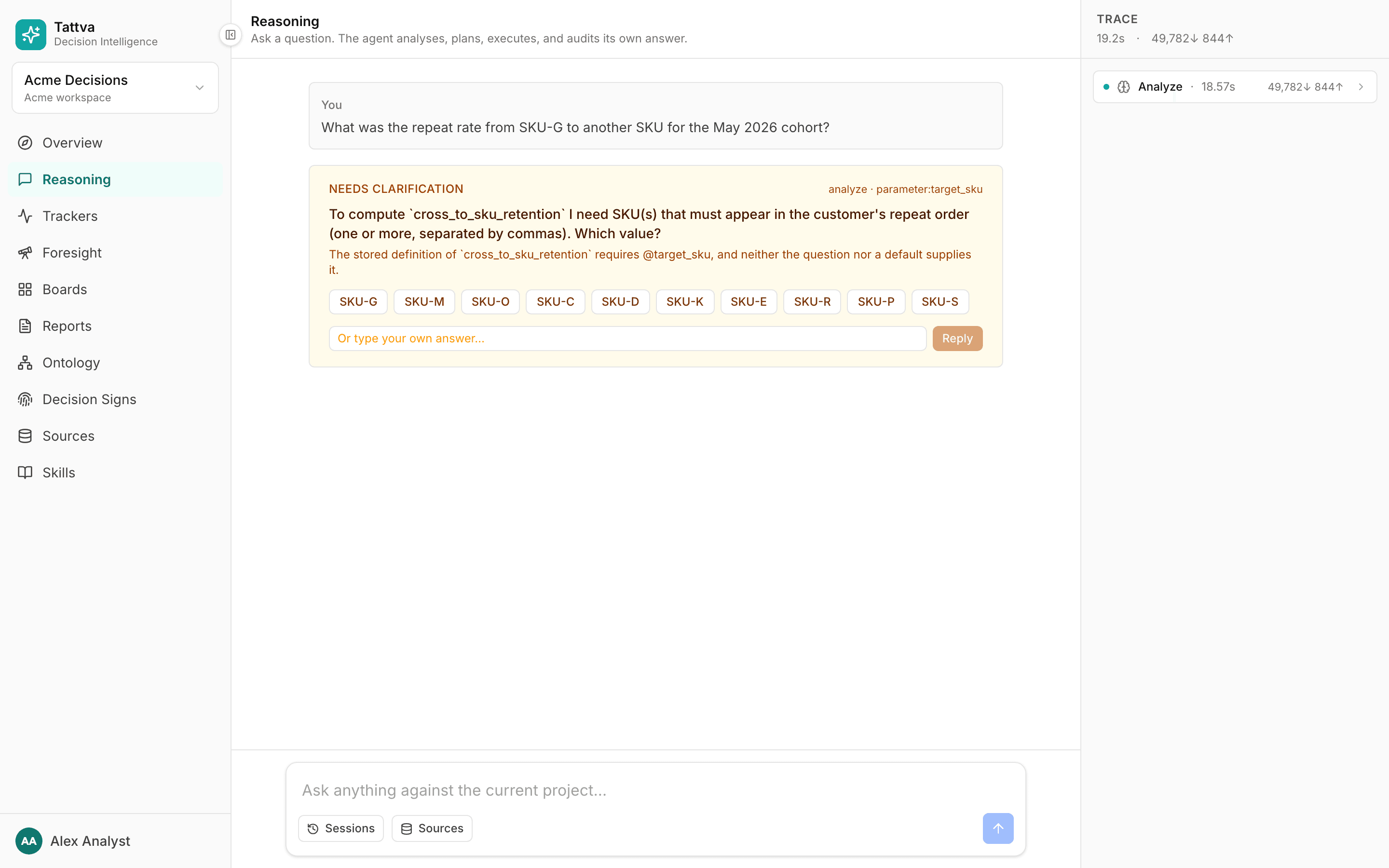
- An input whose column has known values is asked alone, one input at a time: "To compute
<metric>I need … Which value?" The column's common values appear as buttons. Click one, or type your own answer in Or type your own answer… and click Reply. For a list input, separate several values with commas. - Inputs without known values are asked together, as free text: "… I need 2 inputs: 1. … 2. … Answer them in this order, separated by ';'."
- The same inputs are never asked twice. If an answer still leaves an input empty, the Trail shows
Missing: @nameand the answer must say the value is needed instead of guessing it.
Your answer then appears in the Trail with the source you answered.
On the metric's row in Make › Data › Domain, the "Inputs:" line tells you in advance how each input is filled: "the question's period", "(filled in: …)" for a derived date, "(asked)" for a value the question must supply, and "(from the question)" for a value the question can name. See Metrics in Make.
List inputs
A value that changes with the question, such as a warehouse or a SKU, should be a list input on its column:
WHERE warehouse_name IN UNNEST(@warehouses)A list input takes one value or many. It is the only way a grouping reaches BigQuery: a grouping label stands for several raw values, and only IN UNNEST(@…) can match all of them.
Check V11 Mapped columns compared as lists on the review card. It warns when a definition compares a grouped column with =, because then a grouping label matches no raw value. Reject that candidate and say in your document that the value is a list that changes with the question. See Review queue.
Value groupings
One real-world name often has several spellings in the data. Warehouse 1 might appear as WH1_NORTH and Warehouse 1 D2C. A value grouping puts them under one label. After that, a question that says "Warehouse 1" counts every raw value grouped under it.
Why it matters: without a grouping, the label matches only the spelling that equals it, and the answer silently leaves out the rest. With one, the label is widened to all its raw values before the query runs in BigQuery.
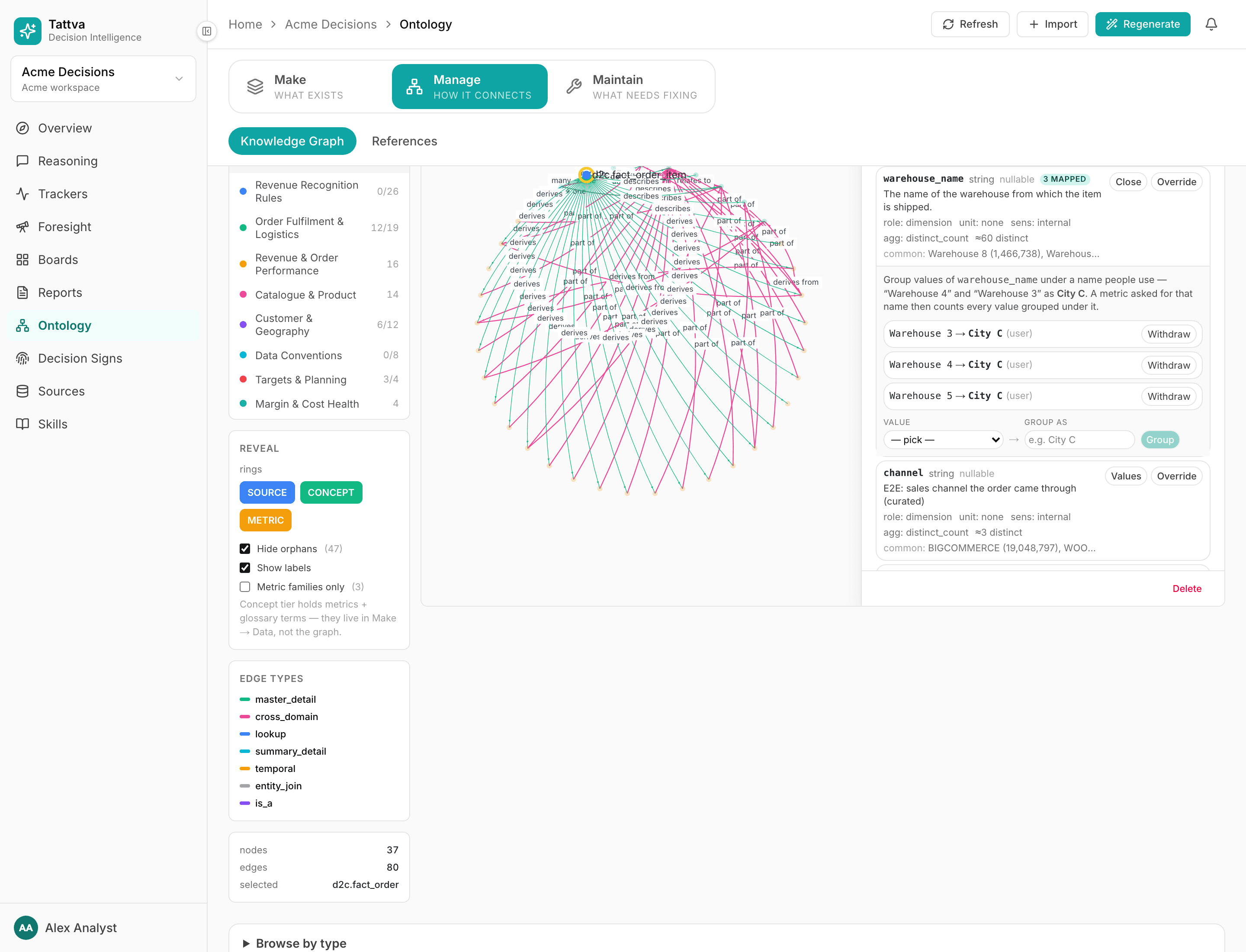
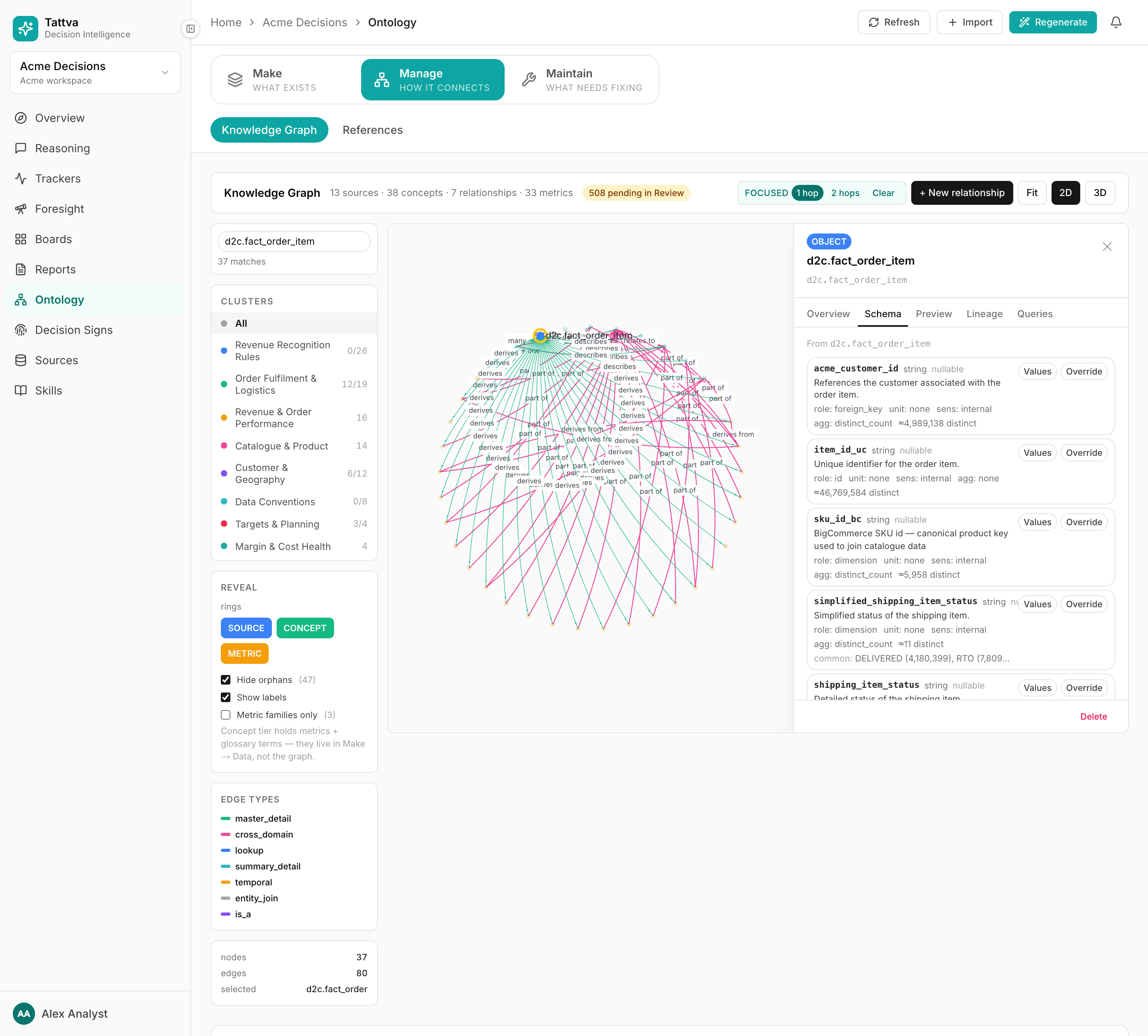
Open Ontology › Manage › Knowledge Graph and click the source (table) node. The drawer opens.
Open the Schema tab and find the column. Click Values.
Pick a raw Value from the list. The list holds real values read from the column, sorted alphabetically; values already grouped are left out. It shows at most 500 values and does not say when it is cut off, so for a column with many values, confirm the exact spellings with a SELECT DISTINCT in the BigQuery console.
Type the label in Group as. Labels already used on this column are suggested, so one label is not spelled two ways.
Click Group. Repeat for every raw value that belongs under the label.
The column then shows an N mapped badge. Existing groupings are listed as raw → label; Withdraw removes one.
Some things to know:
- Changing groupings needs the ontology admin, admin or owner role. A grouping asserts that two values are the same real-world thing and changes every query over the column.
- When the column has a matching canonical column elsewhere, the editor instead offers Unmatched value and Canonical value, both picked from real values, and saves with Map.
- Groupings are yours to maintain. A new raw spelling counts only once you group it too. Look for Data Quality and Modelling conflicts that mention values that do not match; see Maintain.
- In the answer, a widened label shows in the Trail: the Source reads
…; value mapping 'Warehouse 1 → WH1_NORTH, Warehouse 1 D2C', and the Compute card adds a note such as@warehouses: Warehouse 1 widened by value mappings to ….
Column profiles and common values
The clickable choices in a clarification come from the column's profile. Each build profiles your sources. For text columns it records the approximate number of distinct values and, when the column qualifies, its 20 most common values.
A column qualifies when all of these are true:
- It is a text column.
- It has at most 1,000 distinct values. More than that is an ID or free text, not a choice list.
- Its name does not look like personal data (email, phone, name, address, customer ID and similar). Entity names such as
warehouse_nameorproduct_nameare allowed. - It is not marked
piiorrestricted.
A column that fails any of these has no common values, so a clarification about it has no buttons and the user types the value. A BigQuery column with a policy tag goes further: it is not profiled at all, so it has no distinct count and no common values. See Sensitive data.
You see the profile in the Knowledge Graph drawer's Schema tab, under each column: "≈N distinct" (from a scan of the whole table) and "common: …" with counts. Without a profile, the drawer shows "card: N" from a small sample instead. "common: …" is the 20 most frequent values, not all of them, and only for qualifying text columns with at most 1,000 distinct values. The Values list in the grouping editor is a different read: all distinct values, alphabetical, capped at 500.
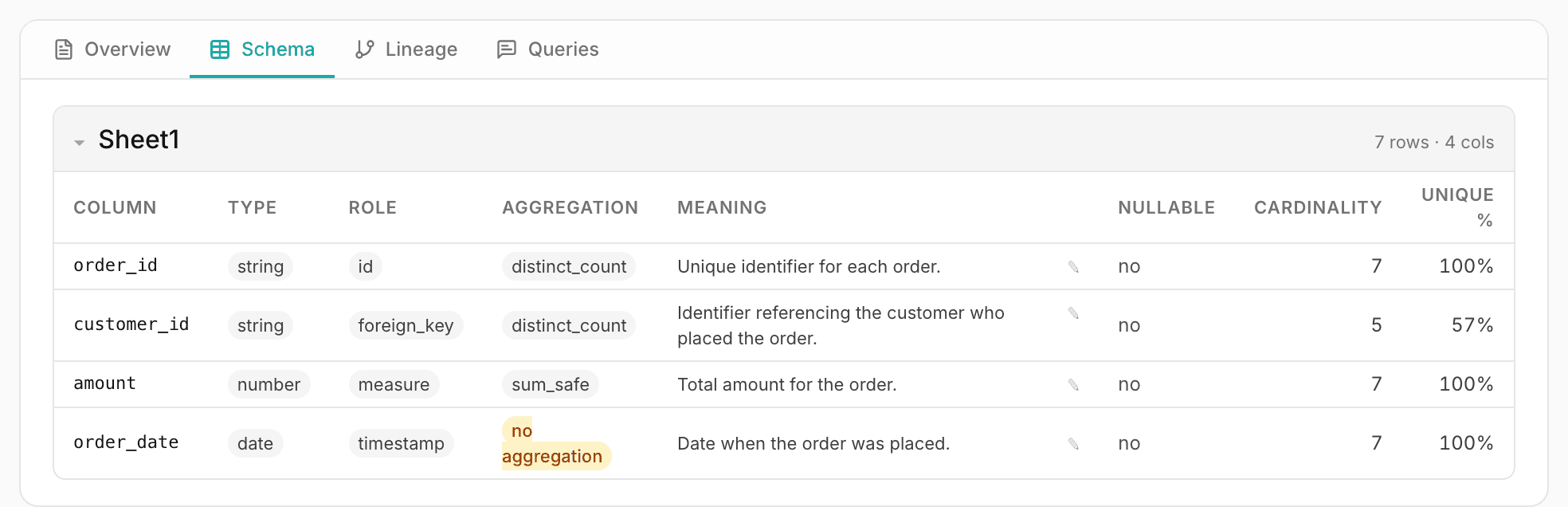
The source's own Schema tab (Sources › a source › Schema) shows the column meanings, and a Cardinality and Unique % from a sample. "≥N" there means at least N distinct values were seen in the sample.
BigQuery profiles are refreshed when they are older than 7 days, or when the source has a newer version. If a column's common values look out of date, rebuild the ontology.