Your role and the lifecycle
What a data analyst owns in Tattva, how the layers fit together, and the path from an empty project to answers built on your definitions.
This section is for the data analyst (DA) who sets Tattva up for a team. You will connect the data, describe it, write down how each metric is calculated, and check what Tattva makes of your words before anyone relies on it. This page shows who does what, how the parts fit together, and the order to work in. Every later page is a self-contained how-to.
Who does what
Tattva has two kinds of user. Most people ask questions. You decide what the numbers mean.
Ask for the Ontology Admin role first
Much of this work needs the Ontology Admin role in the workspace, or admin or owner. Without it, grouping values ("Only ontology_admin / admin / owner can change value mappings"), changing a family's policy, and retiring a settlement or rule ("forbidden") are refused. A workspace admin grants roles in Settings › Workspace.
| Data analyst (you) | Business user | |
|---|---|---|
| Data | Connects BigQuery tables and uploads files on Sources. Describes columns: meaning, role, aggregation, sensitivity. | Uses what is connected. |
| Metrics | Writes metric documents with the exact query or rule for each metric. Reviews and accepts each proposed definition. | Asks for metrics by name ("net revenue last month"). |
| Words | Groups metrics that share a word into families and says what "revenue" means when nobody says which. Groups raw values under one label. | Uses everyday words. Tattva maps them to your definitions. |
| Quality | Works the Maintain tabs: review queue, health, conflicts, versions. | Reads the answer and its Trail. |
| Outputs | Checks that answers compute metrics from your definitions. | Asks in Reasoning, saves trackers, boards and reports. |
You do not need to write SQL for every metric. Tattva proposes metrics from the columns it finds. Your job is to add the metrics that matter, say exactly how they are calculated, and reject proposals that are wrong.
How the layers fit together
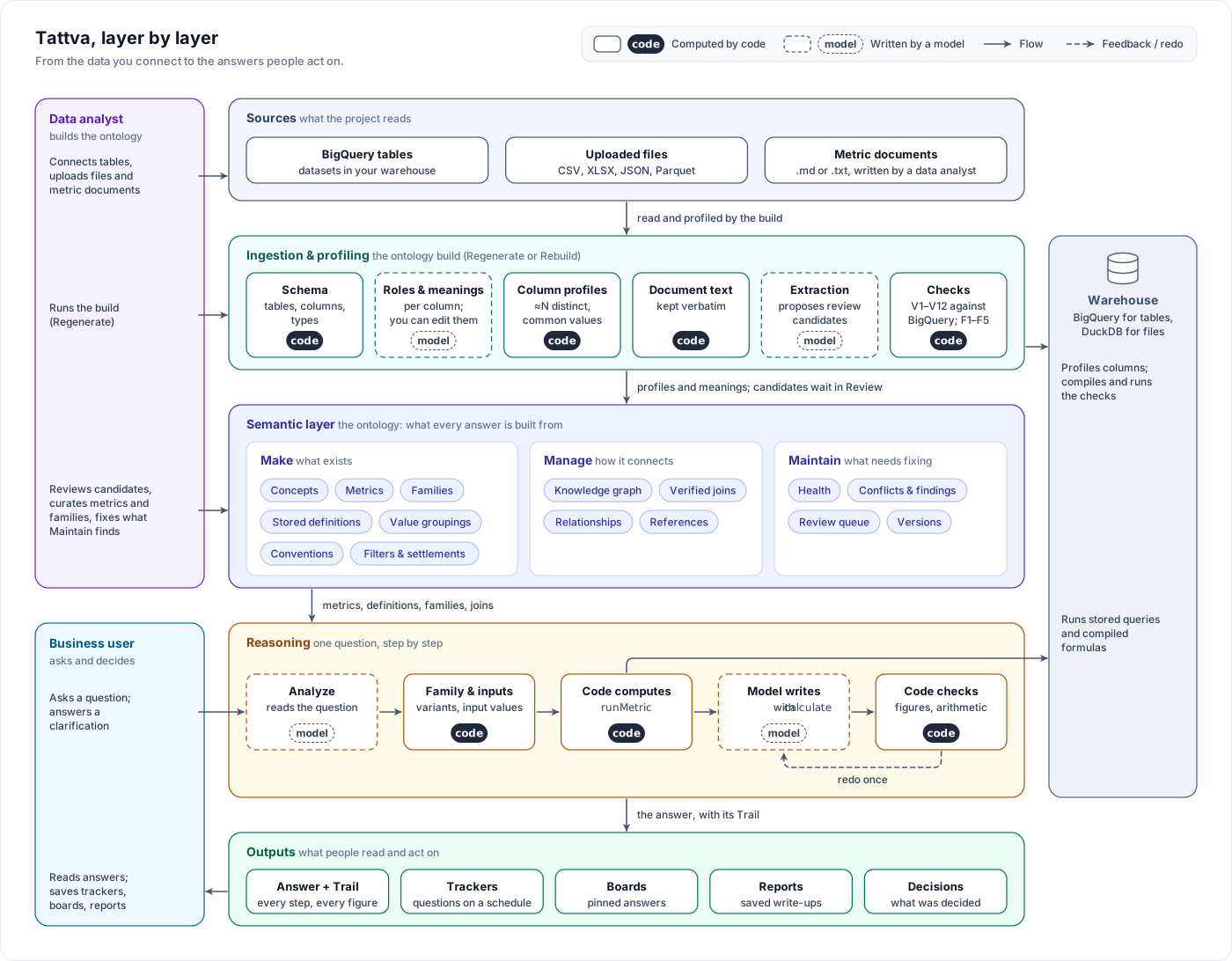
Read the diagram from left to right.
- Sources. BigQuery tables, uploaded files, and your metric documents. You add them on Sources.
- Ingestion and profiling. Each file is parsed and analysed. A build reads every table's columns, profiles them (null counts, distinct counts, common values) and drafts what each column means.
- The semantic layer, called the ontology. This is what Tattva knows about your business. It has three modes, each a group of tabs under Ontology:
- Make (what exists): metrics, stored definitions, families, conventions, column meanings.
- Manage (how it connects): the Knowledge Graph of tables, relationships and joins, and References.
- Maintain (what needs fixing): Health, Conflicts, Review, Promotion, Versions.
- Reasoning. A question is analysed, family words and inputs are resolved, and code computes the metrics you defined before the model writes a word. Code then checks the figures in the draft.
- Outputs. Answers, trackers, boards and reports. Business users work here.
You act on the first three layers. The better they are, the fewer answers depend on the model's own SQL.
The lifecycle
Work through these in order the first time. Later, you will mostly loop between documenting, reviewing and maintaining.
Recommended reading order: first Metric rules: the concepts, for every kind of metric logic and which rule wins, then One metric, end to end, which follows one metric through every step below. Use the other pages as references while you work.
Connect. Add BigQuery tables and upload files on Sources. See Connect and describe data.
Describe. On each source's Schema tab, check the meaning, role and aggregation of the columns that matter. Set the grain and key columns on Overview. See Connect and describe data.
Build. Run a build from Ontology. It reads your sources and your documents and proposes what it found. See Build the ontology.
Document. Write a metric document: one section per metric, with the query you run. Upload it as .md or .txt and build again. See Write a metric document.
Review. Open Maintain › Review. Definitions from your documents have already been run against the warehouse, and families checked; other proposals have not. Accept, defer or reject each one. See Review what Tattva proposes.
Maintain. Check each metric on Make › Data, try it with your own dates, set family policies and value groupings, and work the findings on Maintain. See Metrics in Make and Maintain the ontology.
Answers. Ask a question that uses your metric. Open the answer's Trail and confirm the figure came from your definition. See How answers work.
Nothing you write takes effect until a build and a review
A column meaning you edit is used after the next build. A metric document is read at the next build, and its definitions are used only after you accept them in Maintain › Review.
Start here
Read these two first:
Metric rules: the concepts
Every kind of metric logic in one table, what each source can contain, which rule wins, and the life of a definition.
One metric, end to end
Acme's net revenue from the BigQuery table to an answer, a replacement and a broken build, screen by screen.
Then the reference pages, in the order you will need them:
Connect and describe data
BigQuery tables and uploaded files, column meanings, profiles, grain and key columns.
Build the ontology
Regenerate and Rebuild, the build phases, warnings, and the banners that ask for a build.
Write a metric document
How to write metrics so Tattva stores your query exactly. Includes a complete example.
Review what Tattva proposes
The review queue, every check V1–V12 and F1–F5, and replacing a definition.
Metrics in Make
Metric rows and chips, the Definition tab, Try it, settlement, filters and rules.
Families
One word, several metrics: show all, ask which one, or use a default.
Inputs and groupings
Where each input's value comes from, and grouping raw values under one label.
Knowledge graph
Tables, relationships and joins in Manage.
Maintain the ontology
Health, Conflicts and findings, Versions.
How answers work
Computed by code, provisional and incomplete figures, clarifications, the Trail.
Sensitive data
Column sensitivity, PII clearance and what answers may show.
Data analyst FAQ
Short answers to common questions, and the known limits.
Next
Ask your first question
How to phrase a question, what happens while Tattva works, and how to read the Answer and Trail tabs.
Metric rules: the concepts
Every kind of metric logic in Tattva in one place, with where it comes from, where you see it, who changes it, how it is checked, how answers use it and what a rebuild does to it.