Review what Tattva proposes
Work the review queue, read each check V1–V12 and F1–F5, review corrections, and replace a definition you already accepted.
Nothing Tattva reads from your documents, and nothing a build is unsure of, is used until someone accepts it. On this page you open the review queue, read a card, decide on it alone or in bulk, and learn what every check means and what to do when one fails or is skipped. You also learn how to replace a definition you accepted earlier.
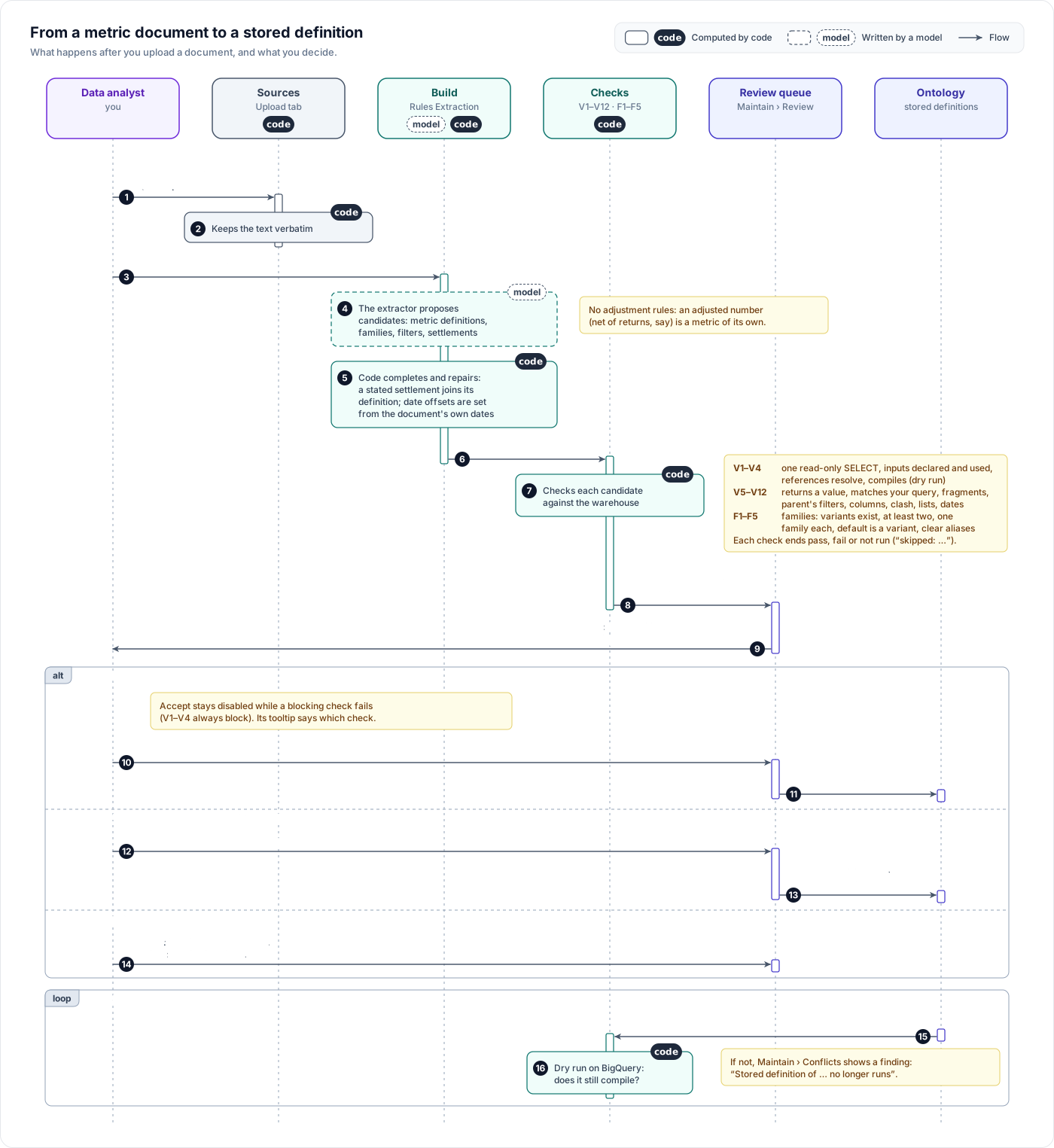
By the time a metric definition card from your document reaches the queue, its checks have already run against BigQuery, and a family card's checks have run too. You are not the first line of defence against broken SQL; you are the judge of whether it computes what your team means. Proposals from a build carry no such checklist; judge them from their content.
Open the queue
Open Ontology › Maintain › Review.
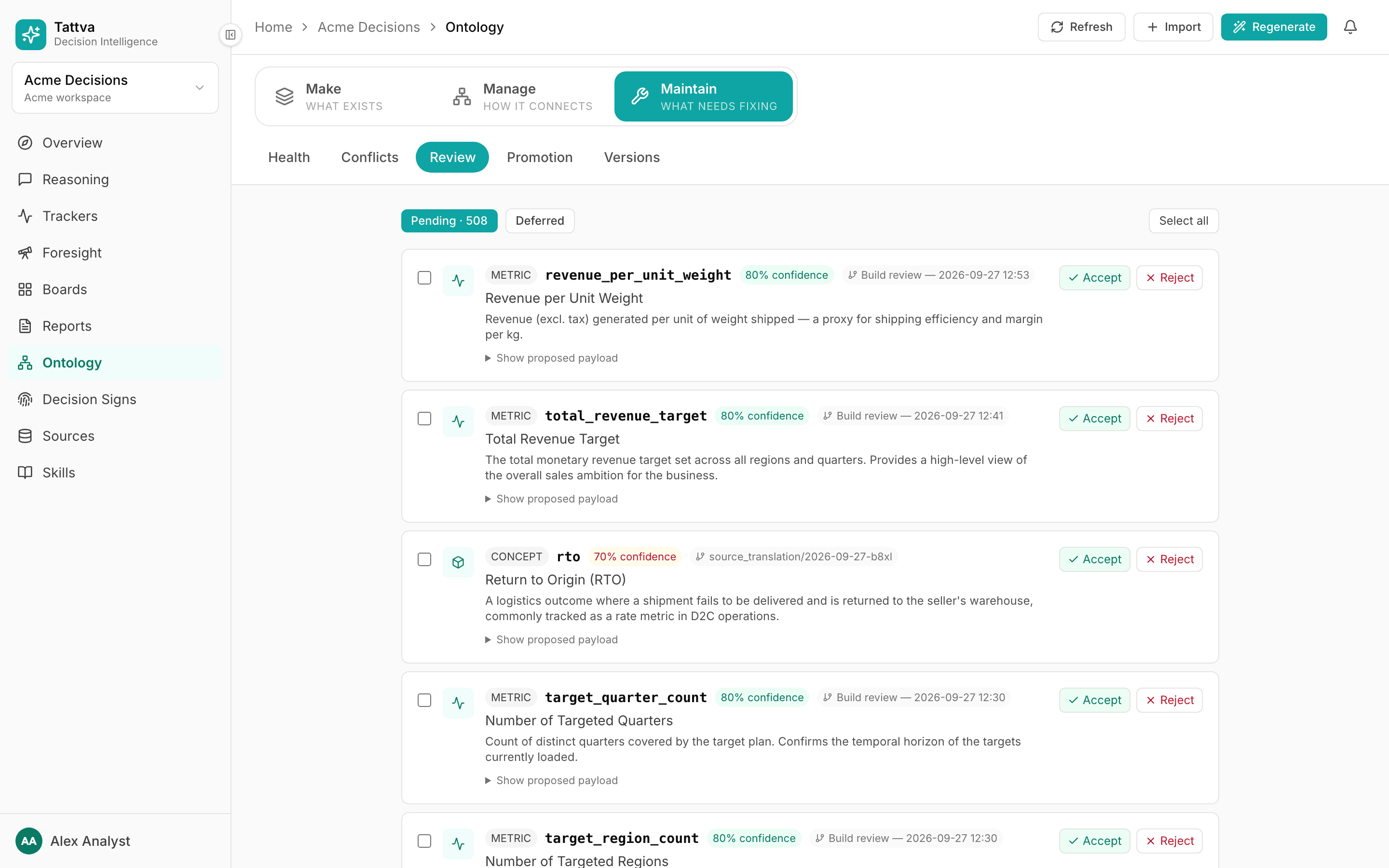
- Pending · N lists everything waiting for a decision: proposals, and the convention and
correctioncards your team made from answer feedback. - Deferred lists what you parked. Deferred items stay reviewable; Back to pending moves one back to Pending without deciding it, and runs a metric definition or family card's checks again.
- Resolved is the history of every decision: accepted and rejected candidates and batch changes, and reviewed corrections, each with its outcome, who decided and when.
- My corrections lists the Not satisfied comments you left under answers and the status of each. Anyone can open it.
An empty queue says "Nothing to review". Proposals from builds and from your documents land here, newest first. There is no search or filter; use your browser's find with the metric's slug. Merge history and rollbacks are on Maintain › Versions.
Who can decide
In every project, deciding in Review (accept, reject, defer, back to pending, and reviewing or deleting a correction) needs the owner, admin or ontology admin role. Members and viewers see the queue read-only, with a note saying so, and can follow their own corrections under My corrections. A refused attempt is recorded in the audit log as rbac.denied.
Read a card
Each card has, from left to right:
- a checkbox, for bulk actions;
- a type chip:
metric definition,metric family,settlement window,reusable filterormeasure rulefor proposals from your documents;entityfor business things named in a document; and types such asglossary termorlink typefor proposals from a build; - the slug, then N% confidence (green at 75% and above, amber below);
- a provenance chip:
rules_docfor metric logic from your documents,document_nerfor entities found in a document, or the build's review batch, such as "Build review — 2026-09-26 10:30". The chip does not name the document.
Below that come the name, the description, and the evidence. On a metric definition card the description is the extractor's summary of your section, not your words; your section is quoted on the metric's Definition tab under Source after you accept it, and your query is under Document's query on the card. Then:
- Applies to
metric: the metric a filter or settlement would attach to. - Red ⚠ lines: clashes. Another pending proposal claims the same slug with different content, or something already applied would conflict. For example: "
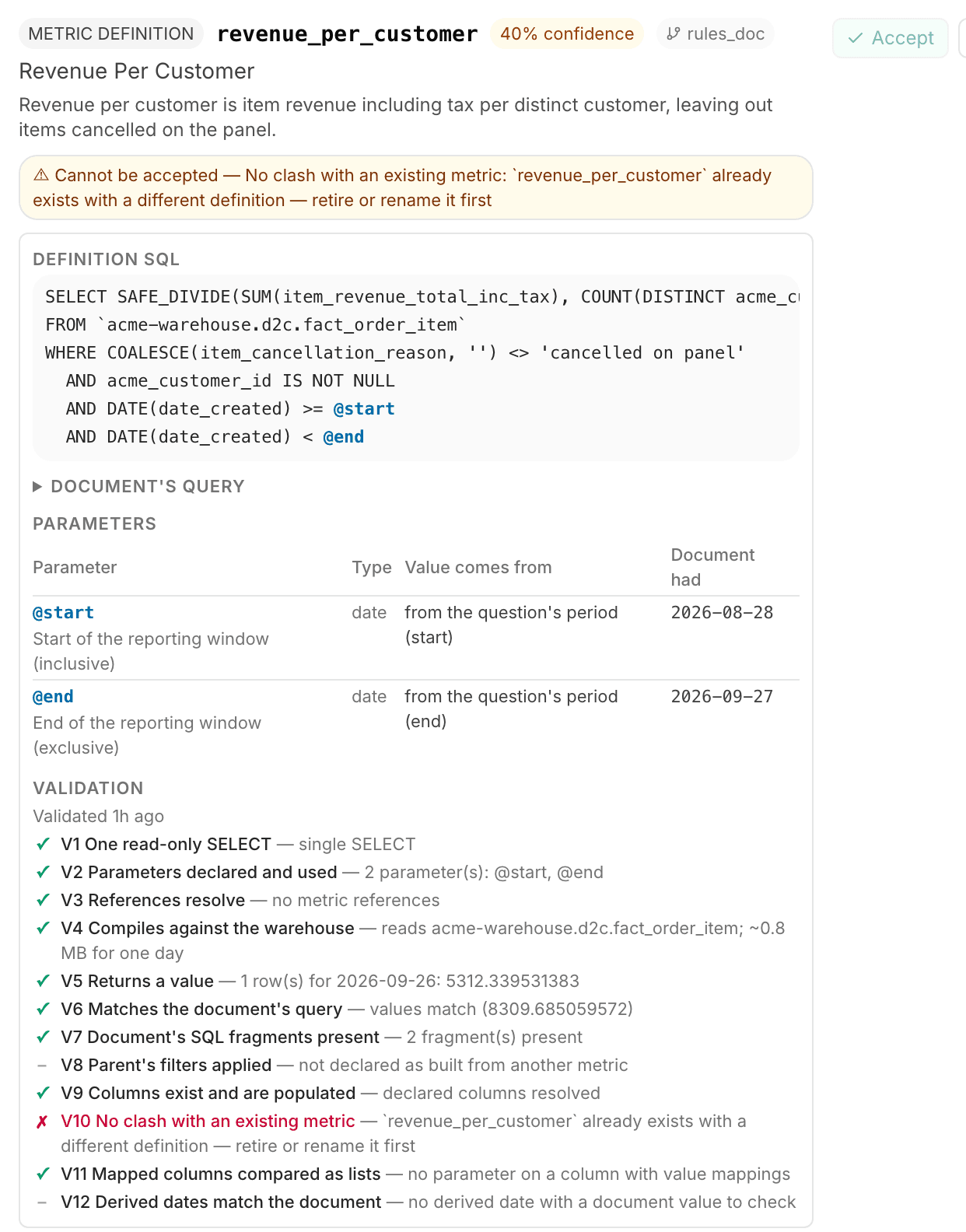
net_revenuealready settles after 14 days. Accepting changes it to 21." or "An applied filter … already means …. Accepting this will be refused — retire or rename the existing one first." - Amber ⚠ lines: open questions. Each failed check is listed here, as "Cannot be accepted — check: evidence" for a blocking one, and as "check: evidence" for a warning. Notes such as "Derived date corrected: …" appear here too.
- Show proposed payload: the raw proposal, if you need it.
A metric definition card with any amber line has its confidence capped at 40%, so it stands out.
A metric definition card
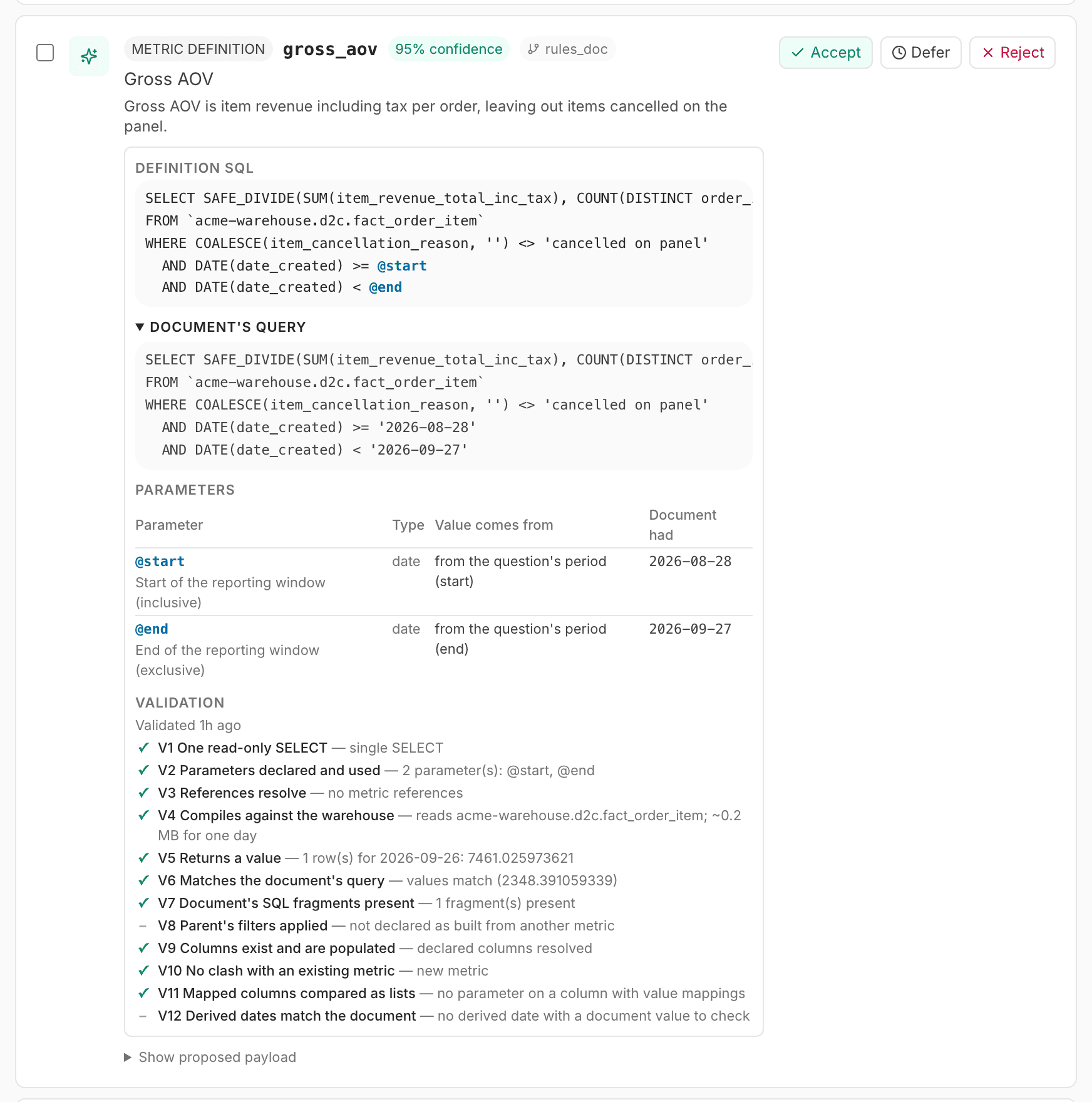
- Definition SQL: the query that will be stored, with inputs highlighted as
@nameand references to other metrics shown as references. Long queries show the first lines; click Show all N lines. - Document's query: your original query, collapsed. Open it and compare.
- Parameters: one row per input, with Parameter, Type, Value comes from and Document had (the literal your query used in its place). "Value comes from" reads, for example, "from the question's period (start)", "the day after the period + 90 days", "filled in by code: tail start − 30 days", "from the question" or "asked from the user". A list input shows "compared with" and its column.
- Settles after N days — a window overlapping the last N days is provisional. Shown when the definition has a settlement.
- Uses: metrics it refers to by name. Built from: metrics it is built from.
- Validation: the checklist, with "Validated … ago".
In the checklist, each line is the check's number and label, then its evidence:
| Mark | Meaning |
|---|---|
| ✓ green | Passed |
| ✗ red | Failed and blocks Accept (hover: "failed — blocks accept") |
| ✗ amber | Failed, advisory (hover: "failed — advisory"). A question for you, not a blocker. |
| – grey | Not run. The evidence says why, often starting "skipped:". |
Decide
Read the evidence, the Definition SQL and the Parameters. Open Document's query and check the two say the same thing.
Click Accept to apply it, Reject to discard it, or Defer to park it under Deferred. From Deferred, you can still Accept or Reject, or click Back to pending to return it to Pending undecided. Items from a build's review batch have no Defer; accept or reject them. A metric definition or family card also has Re-validate on Pending and Deferred: it runs the card's checks again against the project as it is now, for example after you connected the tables V4 named, and keeps the notes ingest wrote. It needs the document the card was read from; if that was deleted, upload it again. The checks run in the background and can take a minute or two on a large definition: the card shows Checks running…, Accept waits until they finish, and the card updates by itself. Clicking Re-validate again while they run does not start (or bill) a second run. If the checks fail to run, the card says why.
To decide many at once, tick their boxes (or Select all) and click Accept selected or Reject selected. Confirm the dialog. Each item is applied on its own. The result says "N item(s) accepted." or "X of Y succeeded." with the failures listed; failed items stay in the queue. Corrections cannot be selected; Select all skips them.
Why Accept is disabled
Hover over the disabled Accept to see why:
- "Cannot be accepted — check: evidence": a blocking check failed. The first blocking failure is named.
- "Accept these metric definitions first: …": a family whose variants are still pending. Accept the variants, then the family.
- "Cannot be accepted — does not exist yet: …": a family names a metric that does not exist.
A card with a blocking failure stays in the queue so you can see why. You cannot fix it in place: correct the document and upload it as a new document, then reject the old card.
Accept means answers will compute this
An accepted definition is what answers, trackers and Try it run for that metric, and the model does not rewrite it. If the SQL is not what your team means, reject it, even when every check is green.
Corrections
When someone clicks Not satisfied under an answer, the comment goes to Ontology › Maintain › Feedback, not here (see Work answer feedback). From there your team sends it to Pending in one click: Create correction makes a correction card, and Create convention makes an ordinary convention card linked to the comment. A comment changes no answer, not even its author's, until it is settled. Make the lasting fix in the ontology, a convention, glossary term, stored definition, column annotation or value grouping, so every member gets the same answer.
A correction card shows the reasons picked, the question, What was wrong and What is correct as the author wrote them, Team's correction (the fix your team described when sending it), the author and date, Open the answer and its Trail (opens the conversation) and an excerpt of the answer. Its buttons are:
- Applied: you made the fix. Choose the Type (convention, term, stored definition, column annotation, value grouping or other) and fill Reference, which suggests existing conventions, terms and stored definitions. Add a note if you like; the author sees it.
- Already covered: an existing rule already gives the right answer. Choose its Type and Reference.
- Not applied: a reason is required; the author sees it.
- Delete: removes the comment outright, for duplicates and tests. The author keeps no record of it.
Accepting a convention card made from a comment also settles the comment: it moves to Fixed as "Applied as convention …". Rejecting it leaves the comment In review in Feedback.
A settled comment moves to Resolved. Its author sees the outcome under the answer, for example "You flagged this answer — Applied as convention “fiscal_year”", and gets a notification.
Metric definition checks V1–V12
V1–V4, V6 and V12 block Accept whenever they fail. V5 blocks only when the query errors, and V10 only on a clash (a replacement never blocks). V7, V8, V9 and V11 are warnings. A check that did not run never blocks.
| Check | What it checks | Blocks Accept? | When it fails or is skipped |
|---|---|---|---|
| V1 One read-only SELECT | One SELECT or WITH query that writes nothing and names its value column | Yes | "more than one statement": put each metric in its own section. "no value column named": name the output column (AS gross_revenue). |
| V2 Parameters declared and used | Every input the query uses is declared and every declared input is used. Each derived date is based on today, the start of the unsettled days, or the period's start or end. | Yes | "used but not declared" or "declared but not used": the extractor lost track of an input; reject it and say plainly which values change with the question. "derived without a usable base … tail_start needs a settlement period": the query treats recent days differently, so state the settlement in days. |
| V3 References resolve | Every metric the definition refers to by name is in this document or already accepted | Yes | Define the referenced metric in the same document, or accept it first. Use its exact name. |
| V4 Compiles against the warehouse | A BigQuery dry run: it is a SELECT, the value column exists and is numeric, the key columns are returned, and every table the SQL names is visible to this project. A view counts as the table it is: the tables behind it need not be sources. | Yes | Read the evidence: "no output column …", "… is STRING, not numeric", "missing key column(s): …", "reads tables this project cannot see: …" (connect the table on Sources, then click Re-validate). "skipped: structural checks failed" means V1–V3 failed first. |
| V5 Returns a value | Runs the definition for one settled day and, if that is empty, with your document's own values | Only when the query errors | "no value for … — may be a period with no data" can be normal: a one-day cohort has no repeat orders. Check with Try it. Not run with "needs a value for @…" or "would scan ~N GiB, over the ingest budget". |
| V6 Matches the document's query | Your query and the definition, run with your document's values, return the same rows. Every date in your query is an input or a fixed date your text states. | Yes | "the document's query for this metric could not be identified": the metric's section holds several queries and none is identifiably its own; give the metric its own heading and one query block, and upload again. "the document's query uses '…', which no parameter carries and the document does not state as a fixed date": a period date was merged into another input (reject), or a fixed business date is not stated in your text (say it next to the query, such as "counts from 1 August 2025", and upload again). When it passes, the evidence names each fixed date and your sentence. A difference in results means the rewrite changed your logic; reject. Not run for prose ("the document has no complete query for this metric") or when your query "does not run on its own". |
| V7 Document's SQL fragments present | The SQL pieces quoted from your document appear in the document and in the definition. Once V6 has passed, a piece the rewrite restructured is not reported. | No | "not in the document: …": the extractor quoted something you did not write. Otherwise a piece you wrote is missing from the definition. Read the SQL and reject if it matters. Not run when no pieces were quoted. |
| V8 Parent's filters applied | A metric built from another applies the parent's row filters | No | "not applied — parent: filter": add the parent's exclusion to your query. "unknown parent(s)": check the parent's name. |
| V9 Columns exist and are populated | The columns the definition reads exist and are not empty everywhere | No | A misspelt or empty column. Also check it is populated for recent periods. |
| V10 No clash with an existing metric | No other metric of this name exists with a different definition | Yes, on a clash | "already exists with a different definition — retire or rename it first": a formula metric the build generated, or a workspace metric, has this name. Reject the card. Then either delete the formula metric on Make › Data › Data and upload the document again as a new file, or rename your metric. See Write a metric document. "same as existing … — use that metric instead": you defined something that exists; reject. When the other metric is a definition this project accepted, the check reads Replaces the accepted definition instead (below). |
| V11 Mapped columns compared as lists | An input on a column with value groupings is a list compared with IN UNNEST(@…) | No | The definition uses = on a grouped column, so a label would match no raw value. Reject it and say that the value is a list that changes with the question. |
| V12 Derived dates match the document | Each derived date, recomputed as of the day the document says its queries were written (or, when it says none, the latest end of its periods) or from its period, equals the date your query used | Yes | "@x gives 2026-09-06, the document used 2026-09-05": check the settlement days, the "N days after the period" wording, and the "as of" day your document states. Not run when there is no derived date to check, or when the document states no "as of" day and has no metric with a reporting period. |
Family checks F1–F5
F1–F4 block Accept. F5 is a warning.
| Check | What it checks | Blocks Accept? | When it fails |
|---|---|---|---|
| F1 Variants exist | Every metric the family covers is accepted or defined in this document | Yes | "… does not exist yet": define it (the same document is fine) or accept its card first. Not run when no variants were named. |
| F2 At least two variants | The family covers two or more metrics | Yes | One metric is not a family. Name the other variant. |
| F3 No variant is in another family | A metric belongs to one family at most | Yes | "already in another family": decide which word the metric belongs to. |
| F4 Default is a variant | A "default" policy names one of its variants, and only that policy names a default | Yes | "the policy is default but no default variant is named": name it ("they mean the overall rate"). "a default … is named but the policy is …": drop the default wording or say it is the default. |
| F5 Aliases are unambiguous | No alias is also a disambiguation term, and no alias is a variant's own name | No | "also a disambiguation term": reword the alias. "dropped — a variant's own name": nothing to do; it was removed. |
A family card
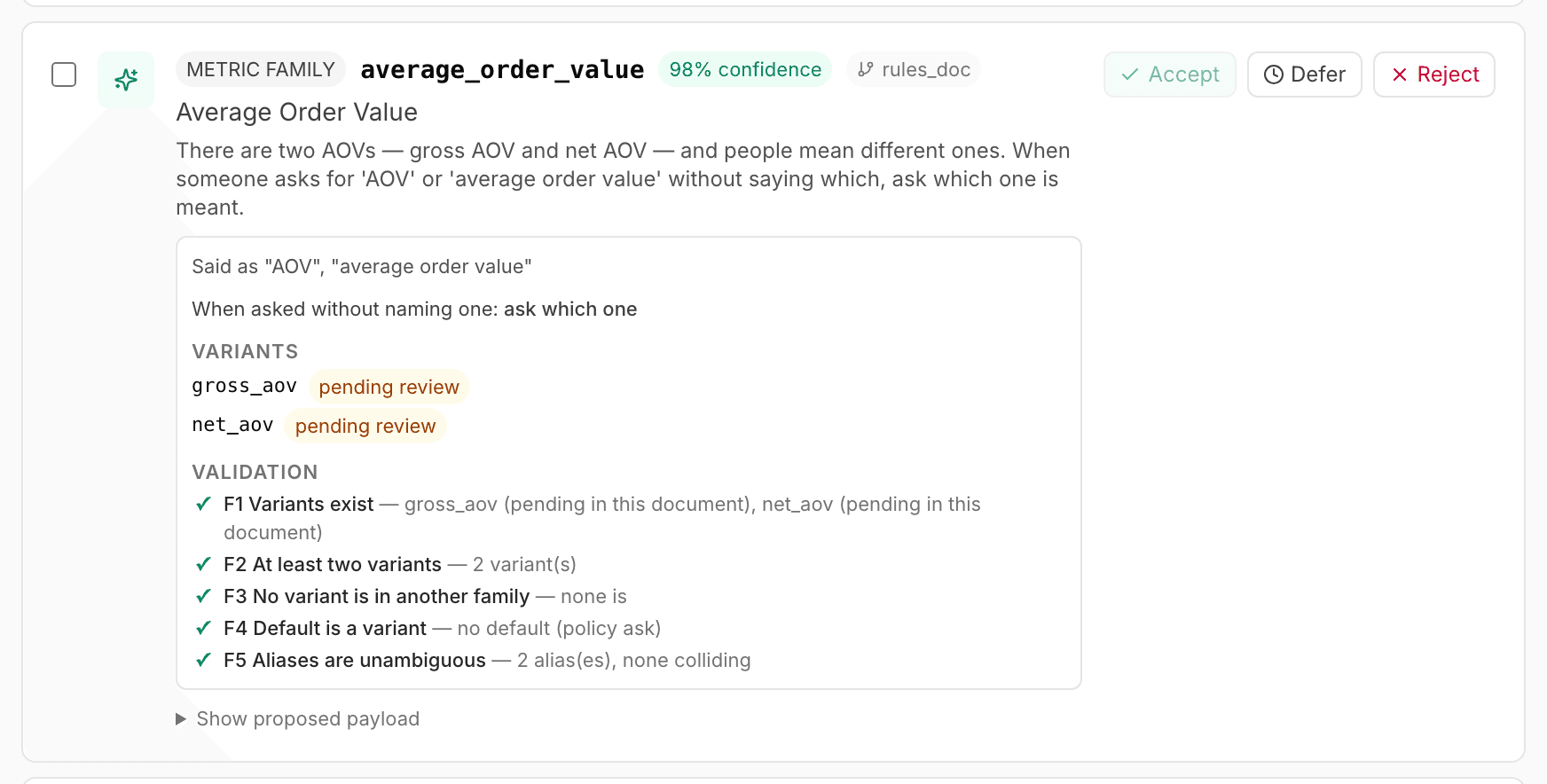
A family card shows:
- Said as "revenue", "sales": the words people use for it.
- When asked without naming one: "show every variant", "ask which one", or "use variant and mention the others with their figures".
- Variants, each marked accepted, pending review or missing.
- Validation: F1–F5.
Accept the variant definitions first. The family's Accept stays disabled while any variant is pending. You can change the policy later on the family's row in Make; see Families.
A dashboard card
A dashboard card is a dashboard declared in a metric document (see Write a metric document). It shows the dashboard's link, the metrics it shows, its breakdowns, its periods and its refresh note.
- Accept adds the dashboard to Make › Dashboards, linked by id to the metrics it names. A metric defined in the same document must be accepted first; the card says which. Accept is refused, with the reason, when a breakdown is not returned by every metric it shows.
- Reject creates nothing.
A dashboard naming a metric that exists neither in the project nor in its Workspace Library, or with no https:// link, never becomes a card.
Settlement and filter cards
- A
settlement windowcard proposes the number of days after which a metric settles. If the metric already has one, a red line says what accepting changes. A settlement for a metric the same document defines is folded into that definition instead of arriving as its own card. - A
reusable filtercard proposes a row exclusion, shown with Applies to when your text named the metric. Filters apply to formula metrics only; a stored definition runs as written.
After you accept them, both appear on the metric's row in Make, where you can retire them. See Metrics in Make.
Replace a definition
A document is read once, so you change an accepted definition by uploading a new one.
Write the corrected section in a new .md or .txt document. Use the same metric name.
Upload it on Sources › Upload and click Regenerate.
Open Maintain › Review. The new card starts with a blue block: "Replaces the accepted definition of metric. Accepting updates it in place — its family membership and edges are kept."
Open SQL changed — compare to see Accepted and Proposed side by side (or read "SQL unchanged."). Below it, each input is listed as Added, Removed or Changed, or "Parameters unchanged."
Check the rest of the checklist, then click Accept.
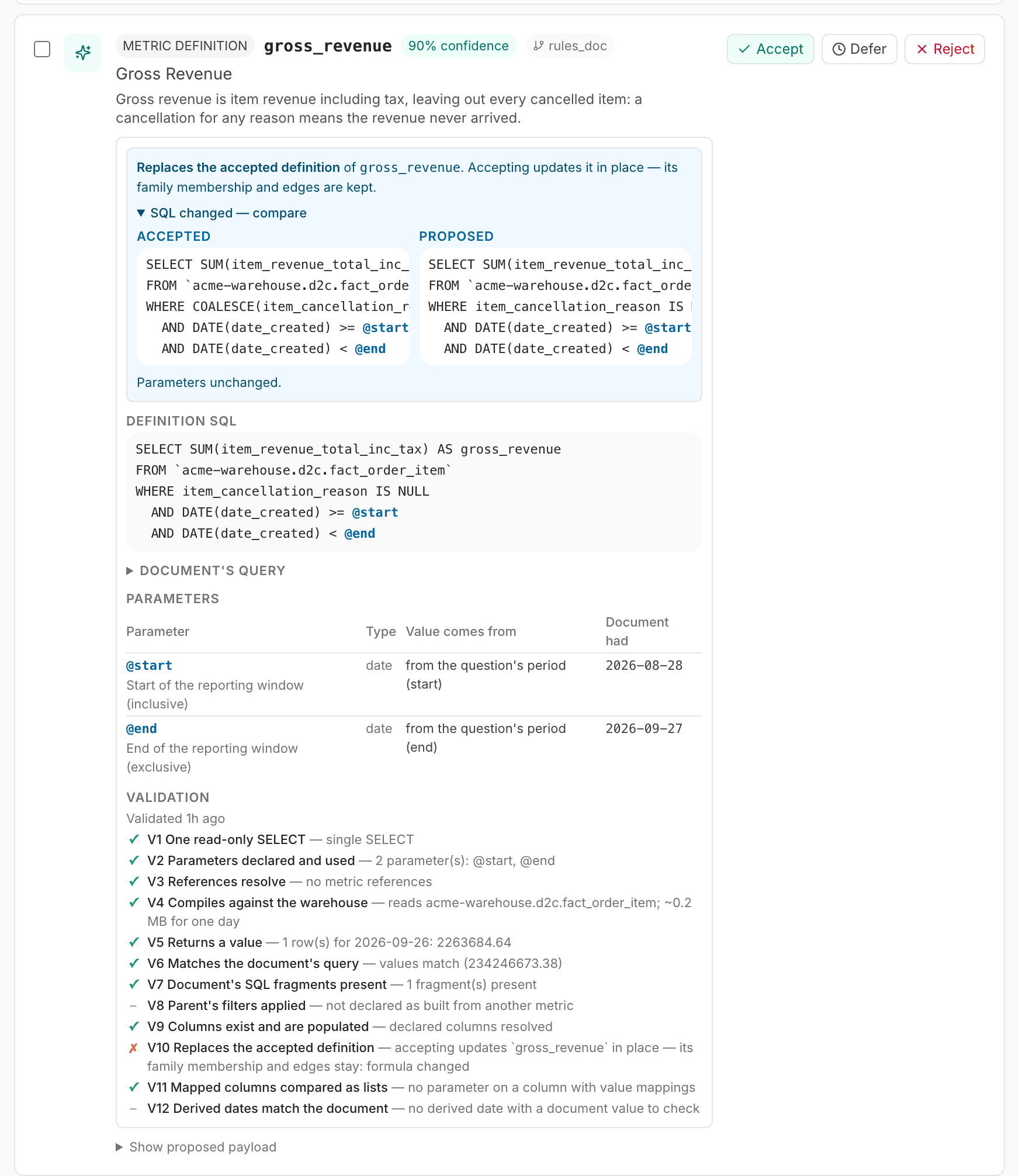
- In the checklist, V10 reads Replaces the accepted definition, marked with an amber ✗, and lists what changed: "formula changed", "value column …", "settles after … days", "parameter added: …", "parameter removed: …", or how an input's meaning changed. An input's description, and the order of the inputs, are not a change. The amber mark is there so you look; it does not block.
- Accepting updates the metric in place. Its family membership and its links to other metrics stay. The review history keeps the previous SQL and inputs.
- An unchanged definition (same SQL, inputs, value column and settlement) gets no card at all: the build's Rules Extraction line counts it as "same as accepted".
- Replacing works only for definitions this project accepted. A formula metric with the same name still blocks: delete it on Make › Data › Data first. A metric inherited from the workspace also blocks: give yours a different name.
Next
Write a metric document
How to write your metrics down so Tattva stores your query exactly, with the right inputs, settlement and families.
Work answer feedback
Read the Not satisfied comments people leave under answers, mark them In review, keep a team note, and turn each into a convention or correction card.