Skills & Reasoning
How an answer is built. The four-phase reasoning flow, the specialists, and reusable skills.
This is the heart of the platform. When you ask a question, the platform doesn't run a single model — it runs an orchestrated flow of analysis, tool selection, execution and reflection. It can also delegate to specialist analysts. And every reusable analysis is captured as a skill you can run again on demand.
What's on the Reasoning screen
Sidebar → Reasoning.
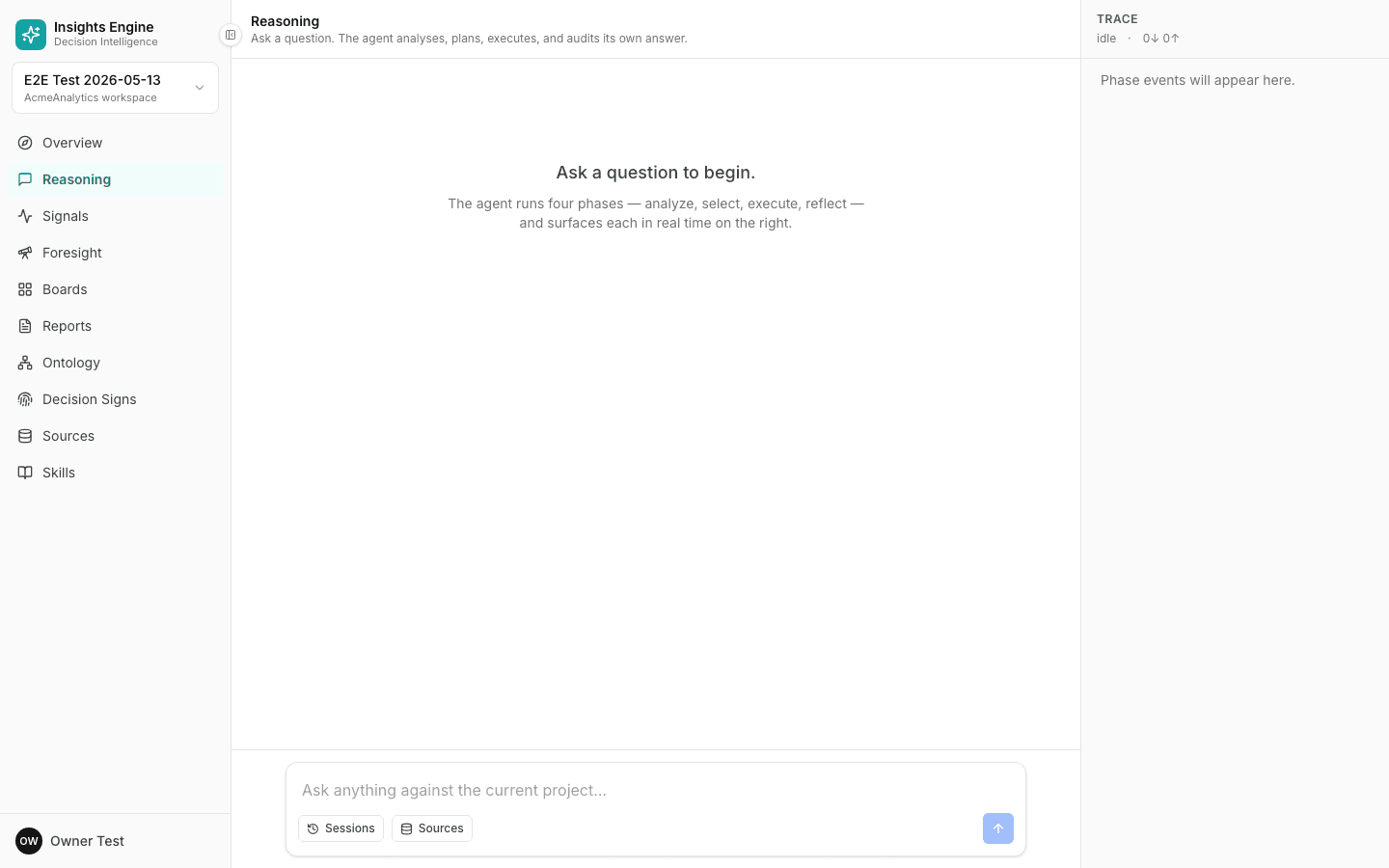
- Main pane — large empty state on first open: "Ask a question to begin. The agent runs four phases — analyze, select, execute, reflect — and surfaces each in real time on the right." Once you submit, the answer streams in here.
- Composer (bottom) — "Ask anything against the current project…" textarea with two pill buttons:
- Sessions — switch between past conversations.
- Sources — scope which sources the question can see.
- Send button (right).
- TRACE rail (right) — live phase-event log. Header shows status (
idle/running), and bytes in/out counters (0↓ 0↑). Empty state: "Phase events will appear here." Each phase emits structured events as it runs. - Page header — title "Reasoning" + tagline "Ask a question. The agent analyses, plans, executes, and audits its own answer."
The four-phase flow
Every question goes through the same four phases — visible in the TRACE rail as the run progresses:
1. Analyze
The platform reads your question and restates what it understands:
- Intent — what kind of question is this? (lookup, ranking, trend, root-cause, forecast, attribution, optimization, scenario, etc.)
- Entities — which things are you asking about? (a customer segment, a campaign, a SKU)
- Time window — over what period?
- Granularity — daily, weekly, monthly, by-segment, by-channel?
If anything is ambiguous, the platform pauses here and asks you to clarify. (Better one clarifying question than a wrong answer.)
2. Select
Now it picks an approach. The strategies are:
- Answer from brief — already enough context, just respond.
- Single tool — one focused query against one source.
- Multi tool — chain several queries together.
- Specialist — hand off to a specialist analyst (see below).
- Specialist chain — chain multiple specialists in series.
You'll see which strategy was chosen and why.
3. Execute
The selected plan runs. Tools fetch data, compute intermediate values, run statistical tests, build comparisons. You see a live tool trail — every step is expandable.
4. Reflect
A final pass cross-checks the draft answer:
- Does the evidence actually support the claim?
- Are the assumptions called out?
- Is anything left unexplained?
If reflection catches a problem, it can loop back and re-run the upstream phase before finalising the answer.
The specialists
For deep analysis, the platform delegates to one of five specialist analysts:
- RCA (Root-Cause Analyst) — "Why did X drop/spike?" Decomposes a metric change into contributing causes, ranked by impact.
- Forecast — "What will X look like next period?" Builds a projection with confidence bands and lists the assumptions.
- Attribution — "Which channel/campaign/segment is responsible?" Decomposes a quantity across attribution paths.
- Optimize — "Where should I shift X to maximise Y?" Suggests reallocations.
- Foresight — "What might go wrong / where's the upside?" — forward-looking; covered separately in Foresight.
Each specialist has its own playbook — they don't just call an LLM, they run domain-specific analysis flows.
Skills
Some analyses are valuable enough to reuse. Skills are typed, versioned, named workflows — the platform's "verbs". Examples:
- "Quarterly channel decomposition"
- "Weekly CSAT root-cause"
- "Cohort retention by signup month"
What's on the Skills screen
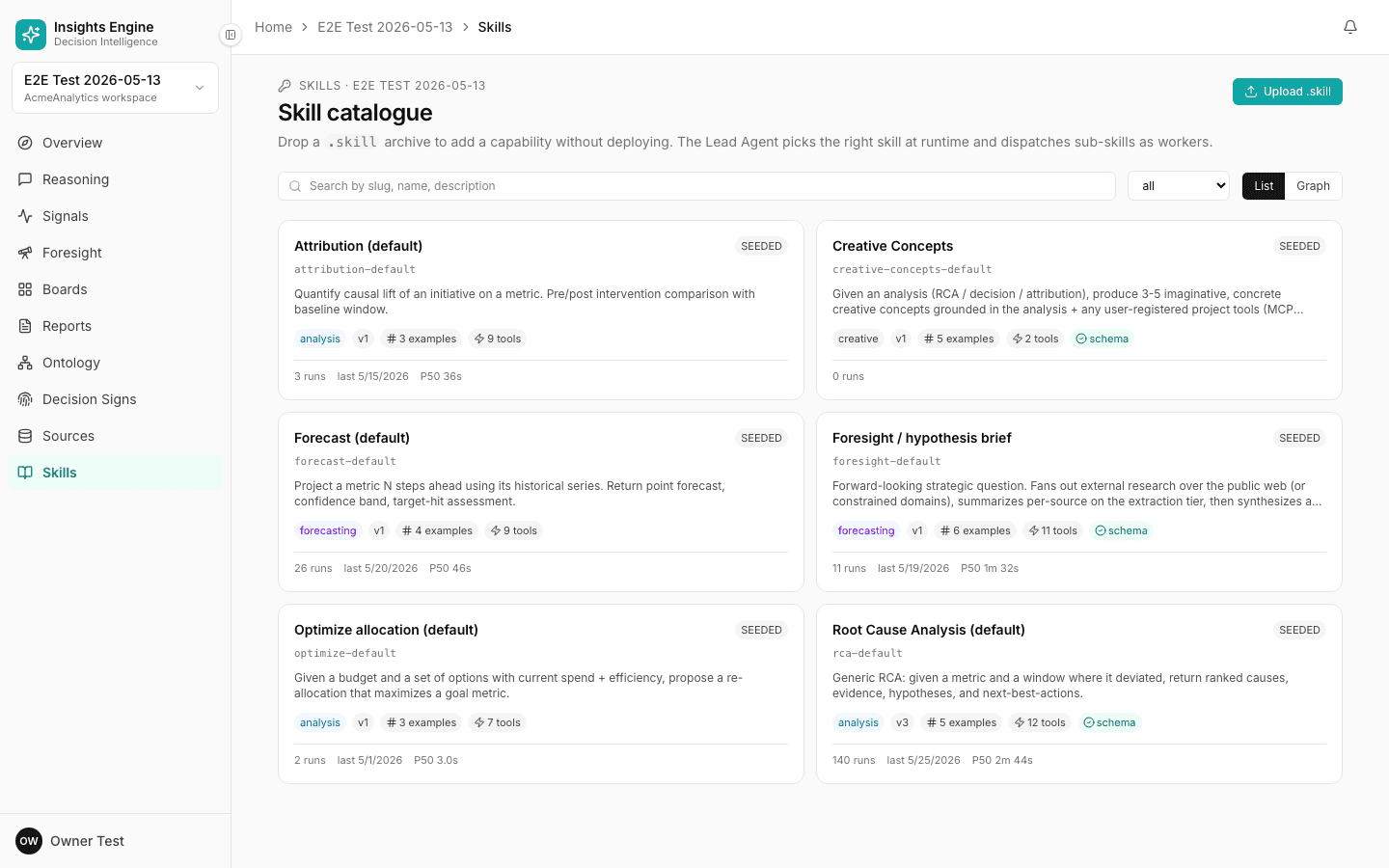
Sidebar → Skills. The page is titled "Skill catalogue".
- Search — filter by slug, name, or description.
- Filter dropdown — narrow to a specific category (analysis, forecasting, creative, etc.).
- View toggle — List (cards in a grid) or Graph (visualises how skills compose into each other via sub-skill references).
- Upload .skill button (top-right) — drop a
.skillarchive to add a new capability without a deploy.
Each skill card shows:
- Name + version tag (e.g.
v1) + SEEDED / UPLOADED / FORKED badge - Slug (e.g.
attribution-default,rca-default,forecast-default) - Description in one line
- Stats row: category tag, version, examples count, tools count, schema badge
- Run history: total runs, last-run date, P50 duration (e.g. "3 runs · last 15/05/2026 · P50 36s")
Seeded skills you'll see by default
- Attribution (default) —
attribution-default— Quantify causal lift of an initiative on a metric. Pre/post intervention comparison. - Creative Concepts —
creative-concepts-default— Given an analysis, produce 3-5 imaginative concrete creative concepts grounded in the analysis + any user-registered project tools (MCP-compatible). - Forecast (default) —
forecast-default— Project a metric N steps ahead from its historical series. Returns point forecast, confidence band, and target-hit assessment. - Foresight / hypothesis brief —
foresight-default— Fans out external research over the web (or constrained domains), summarises per-source, synthesises. - Optimize allocation (default) —
optimize-default— Given a budget and a set of options with current spend + efficiency, propose a reallocation that maximises a goal metric. - Root Cause Analysis (default) —
rca-default— Given a metric and a window where it deviated, return ranked causes, evidence, hypotheses, and next-best actions.
You can run a skill from its detail page, embed it in a Reasoning answer (the Select phase may pick it automatically), or schedule it via a tracker. To customise, Fork a seeded skill (see Custom skills).
What's on the Skill detail screen
Click any skill card → /skills/<slug>. The detail page is the per-skill workbench.
- Header — SKILL DETAIL label + the friendly name + metadata row:
slug · vN · SEEDED|UPLOADED|FORKED · category. Example: "rca-default · v3 · SEEDED · analysis". - Description — one-paragraph summary of what the skill does.
- Action buttons (top-right) — Delete (disabled for seeded skills; available for forked/uploaded), plus Fork for seeded skills.
- Tab bar:
- Overview (default) — trigger examples + run-this-skill console.
- Prompt — the skill's system prompt (markdown). Editable for forked/uploaded skills.
- Sub-skills — child skills this one composes.
- References — example inputs/outputs and source links.
- Tools — the tool allowlist for this skill (which platform tools it can call).
- Schema — input + output JSON schemas.
- Runs — recent runs with input, output, duration, status.
- Stats line — "N sub-skills · M tools allowed · K examples · L recent runs".
Overview tab content
- TRIGGER EXAMPLES card — list of natural-language questions that should route to this skill. For RCA the seeded examples are:
- "Why did blended CAC spike last week?"
- "What caused the drop in repeat rate?"
- "Diagnose the Q3 revenue gap"
- "Investigate why Amazon revenue dropped"
- "What's behind the LTV decline?"
- RUN THIS SKILL card — JSON input textarea (default
{}), Use last successful input button to pre-fill, Run skill button.
Why this design
- Honest evidence — the reflection phase exists specifically to stop confident-but-wrong answers.
- Specialist depth — RCA and Forecast aren't generic prompts; they're real flows that the rest of the platform can call.
- Reusability — turning recurring analyses into skills means your team isn't re-deriving the same analysis every quarter.
- Auditability — every phase, every tool, every assumption is logged. You can replay a run a year later.