How answers work
How a question becomes an answer, how to read the Trail and the Compute card, and what to fix when a number is wrong.
When a question mentions a metric you defined, code computes it before the model writes a word. The model then writes the answer around those figures, and code checks the result. This page follows one question through that path and shows you where to look when you want to check it.
The flow
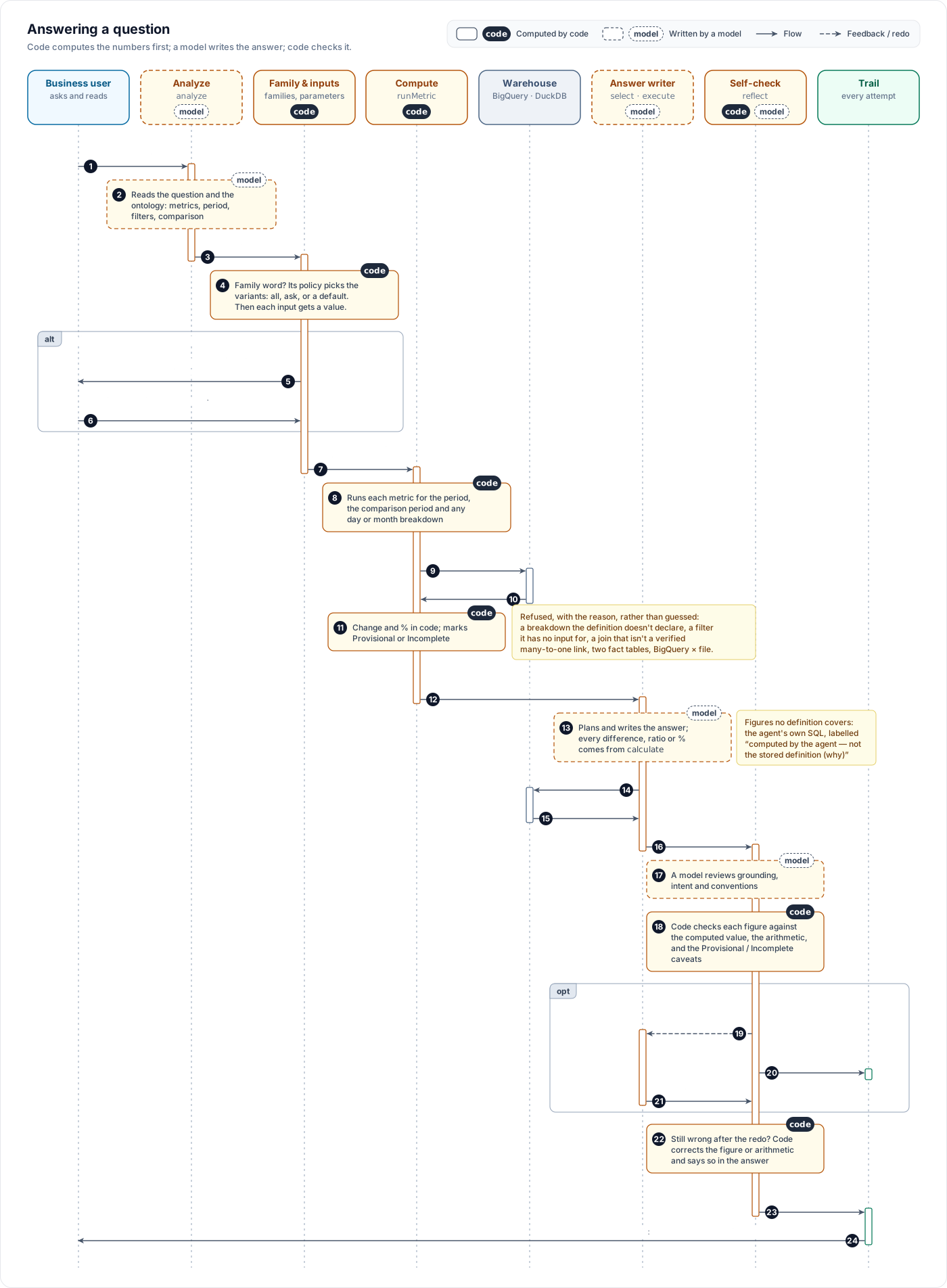
Analyze. The question is read: its intent, the metrics it names, the period ("last 30 days", "August") and any values it names (a SKU, a city).
Family step. If the question uses a family word such as "revenue" and names no variant, the family's policy decides: show every variant, ask which one, or use the default and mention the others with their figures. See Families.
Inputs. Each input of the stored definition gets a value: from the period, from a derived date, from a value named in the question, or from a grouping. If an input is still missing, the answer stops and asks. See Inputs and groupings.
Code computes covered metrics. Before the model writes, code runs each covered metric for the question's period. A stored definition runs as your query, with the inputs bound. A formula metric is compiled with its filters and only verified many-to-one joins. Code also runs the comparison period ("vs last month", "vs last year") and computes the change and the percentage. When a family's policy is to use a default and the question asks for the family's value, code also runs each other variant that returns one total, over the same period, so the answer can give its figure beside the default's.
For a metric that returns one row per product (or channel, or another key) compared across two periods ("top 10 draggers and lifters last week vs the week before"), code also computes the change row by row, before any rows are cut to a top N. Rows are matched on the definition's declared key columns, and each gets the prior figure, the current figure, the change and the percentage; a row present in only one period is marked new or gone. Code then lists the biggest falls and rises: the top N when the question asks for one, otherwise every row, sorted. The total change of each top N and its share of the overall change are given only when the rows add up to the metric's overall figure in both periods. The model gets these as a "Changes by <key>" block (for example "Changes by product") and copies the figures from it; it does not compute them with calculate.
The model writes. It states the computed figures as they are. For a ranked breakdown whose rows add up (net revenue by product, highest first), code also gives the total of each top N and its share of the overall figure, so "the top 10 make 62.09 crore, 86.64% of net revenue" is copied from code, never added up by the model. When the rows of a run are the whole group the question asked for (nothing was cut, or they were cut only by the question's own filter, such as the four rows of one product family), code also totals them: "total of these 4 rows … summed in code". Only columns that add up are totalled, decided from the final SELECT of your stored query: a column computed with a division, SAFE_DIVIDE, AVG, a distinct count, MIN/MAX or a window function is not, and neither are key and date columns, so CM1 is totalled and CM3 margin is not. Rows cut to a top N or by the 200-row limit are not totalled. Any other arithmetic (a ratio, a share, a growth rate) must go through the calculate tool, which computes it in code. Every number given to calculate must be a figure the run returned (code's figures, query results, or a number in the question; small whole numbers and powers of ten are allowed as constants). A number that is not, for example one typed ten times too large, is refused, and the model is told the nearest figure the run did return. When your definition cannot answer a part of the question, the model writes its own SQL, and that figure must be labelled as not coming from the stored definition.
A pass that writes no answer runs once more. Sometimes the model stops without writing an answer: a tool call it made could not run, it wrote nothing, or it wrote only its working ("Now I have all three metrics. Let me assemble the top 10…"). The writing step then runs once more by itself, straight away, on the same plan. If the second attempt also stops without an answer, you see "Could not complete this answer" with the model's working quoted below it, never the working presented as an answer. When the model ran out of room while writing a tool call (a long query, for example), the second attempt gets twice the room; if it is cut off again, the notice says the query it needed was too long to write in one step. The self-check does not run on that notice and no redo follows, because there is no answer to check. An answer cut off mid-text always ends with a note saying so. Asking again usually works. On the reasoning page's phase timeline, the execute row's outputs show retry with the reason the first attempt stopped.
Code checks, and asks for a redo. Reflect checks the draft: a figure for your metric that differs from the computed one, wrong arithmetic between the run's figures, an incomplete figure given without its caveat, or a statement one of your project's conventions forbids (for example a comparison between rows when observations may only restate the table, a share nobody asked for, or a pointer to another system for personal data). Any of these sends the answer back. A figure that equals any number code computed for the question, including a row of a metric that returns one row per channel or product, is code's figure, whichever metric name it stands beside. When only its wording must change (a statement a convention forbids, a share nobody asked for), Execute revises the answer it wrote, with the correction, and runs no query: the revised answer keeps the first answer's query results. When code found a figure, the arithmetic, the SQL's period or a comparison between rows wrong, or the self-check could not ground a claim or found the answer off the question, Execute runs again on the same plan, with the correction. A statement a convention forbids that code can take out by itself (a clause, a bracketed aside, or a whole sentence after the answer's opening) does not cause a redo; code removes it before the answer is shown. That holds even when the self-check itself asked for the redo, as long as those statements are all it found: every claim grounded, the answer on the question, and no other change asked for (content to add, a column or suggestion to drop). Only a statement in the answer's opening (its first sentence, or anything before its first table), or one the self-check says is partly allowed, is sent back to be rewritten. After a redo, the second check is given the first check's correction as decided, so it does not ask to undo it. Arithmetic means a calculation the answer states: "A ÷ B = C", or a result in one table cell with its working in the next. Two figures written as a pair, such as "1,962 / 26,415" for RTO orders out of all orders, are not a calculation and are left as written.
A redo does not get a fresh budget. It gets only the steps the first pass left unused (at least two), and it starts only when the time already spent plus the time the first pass's writing and checking took fits the answer's time limit; otherwise the first answer goes on to the final corrections. A redo that ends without a complete answer never replaces the first answer: the first answer is shipped, with its corrections.
Final corrections. Whatever is still wrong after the redo is corrected in code, and the answer says so under a line at the end, for example "Arithmetic corrected in code from the run's figures: …", "Figures corrected in code against the query result: …", "Total corrected in code from the rows: ₹12,22,250 → ₹11,22,250" or "Removed before this answer was shown: one statement the project's answer rules do not allow — see the Trail." The removed words, and the convention that removed each, are listed on the shipped attempt's Execute card in the Trail. Code removes a statement only when the self-check names one of your project's recorded conventions by its exact slug and confirms the statement breaks it. A statement the self-check says is allowed or exempt (for example a why answer under a rule for lookups) stays. A sentence it says is partly allowed (a data quality note with a share in it, say) is removed after the redo only when every figure in it is already in the answer's tables or in the words the self-check named; otherwise it stays. Code never removes a whole sentence from the answer's opening; when wording a convention forbids is left there, a note under the answer says so. A note under the answer says something was removed or corrected only when code made that change.
A figure the self-check calls fabricated is never shipped. A figure that code or a query returned is never treated as fabricated. Whatever path the answer leaves by, including when it ships after a redo or when the self-check did not finish, code first cuts each table row or sentence that still carries a fabricated figure. If that would leave too little, the answer is replaced by code's own tables of the computed figures. If there are none, you see "Could not complete this answer" listing only the figures that were verified. A "Could not complete" notice never has other figures (such as a gross revenue sentence) added to it, and when the steps ran out it gives the reason from the calls that were made.
When your project has recorded conventions, code lists every observation sentence after the answer's table (each sentence of the list or paragraph under a label such as "Key observations:"), and the self-check must give a verdict on each one: the convention it breaks, or none. Code removes each sentence given a convention, the same way as above. If the self-check itself fails to finish, the answer ships with a note that its wording and claims were not reviewed; its figures were still checked in code against the query results, the period and the stated arithmetic, and anything those checks found is noted too. A negative ₹ figure may carry its minus sign before or after the ₹, as - or −; it is checked with its sign and never rewritten across it.
Plain answers. Answers are written for business readers: no SQL, and no table, column, query-setting or convention names. When a project rule or a definition's date range decides the answer, the answer says what it says in plain words, for example "The D2C P&L starts on 1 April 2025, so there is no P&L for March 2025". Code checks the draft for the names the run itself used (your conventions' slugs, the computed definitions, and the tables, settings and parameters of the queries that ran) and sends it back once to reword them; a SQL block still left after that is removed. A question asking what a definition is may show its SQL. When a stored definition runs and returns no figures for the period, the answer says the figure is not available for that period. The SQL is always in the Trail.
Source line. Code, not the model, writes the closing Source line: the stored definitions computed and the tables their queries read for the period. A table is left out only when its part of the query provably reads nothing for the period, for example a branch whose date settings start after the period ends; when that cannot be decided, the table is listed. An answer whose queries returned no figures has no Source line.
Two things never happen. Two fact tables are never row-joined, because that multiplies rows. And there are no joins across engines: a BigQuery table and an uploaded file are never joined in one query. Each is computed on its own.
The answer
A finished answer has two tabs: Answer and Trail · N, where N counts the phases that ran plus any redo.
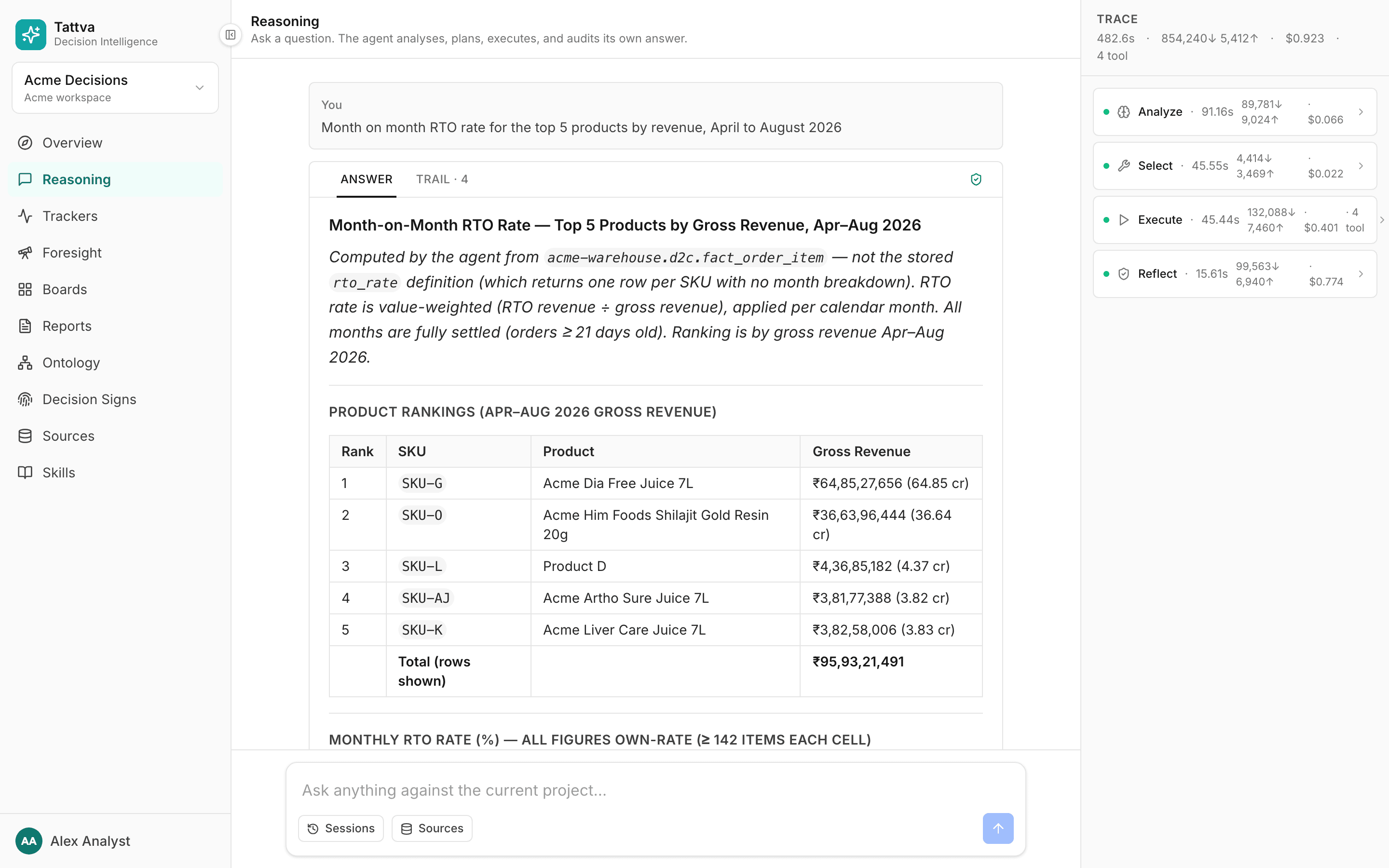
The Answer tab holds the text, any tables, and the toolbar: Save as report, Save as tracker, Copy tables (TSV) and Pin to board. Notes from the checks appear at the end, each starting with ⓘ.
Tables and charts. A column whose every cell is a number is right-aligned. Under a table, code draws a chart when the table's figures call for one. It decides from the cells alone, never from the column headings or the text around the table:
- Periods and figures (months, dates, quarters or years, with one to three columns of figures in the same unit): a line, or bars when there are six periods or fewer.
- Names and figures (products, channels, with one or two columns of figures in the same unit): bars, drawn sideways when the names are long. A Rank or # column is not drawn. A total row at the end is left out.
- A P&L statement (line items with signed amounts, where some lines equal the running total of the lines above them, such as Net Revenue, Gross Margin, CM1): a waterfall. Each subtotal is a full bar; each line in between moves the total up or down.
- No chart when the table has one row, a column mixes units (amounts and a margin %), it has more than 50 rows, or it does not fit one of the shapes above.
The unit comes from the cells: ₹1,23,456 is an amount, 28.03% a percentage, a bare number a quantity. Figures drawn together must share a unit and be within ten times of each other: in a top 10 with net revenue, units and orders, only net revenue is drawn. Charts are drawn with Flint and appear once the answer is finished, not while it streams. A time axis of months, quarters or years has one tick per period, labelled Apr 2026 or Q2 2026 (on a long run of months, one tick per quarter). Days keep date ticks. A figure axis that reaches a crore ticks in crore (15 Cr, 10 Cr, 5 Cr, 0, −2 Cr), one that reaches a lakh ticks in lakh (5 L, 10 L); smaller figures keep Indian grouping (80,000). Value labels read in crore and lakh (16.5 Cr, 85.5 L), and in full below a lakh (85,000). Names under a chart are never cut: a long one wraps onto two lines, and when that is still too wide the names are drawn at a slant. Legends show each series name in full, and a wide legend moves under the chart.
In a waterfall with Values on, each line shows only its own amount (−4.03 Cr) and each subtotal (Net Revenue, CM1, …) its total. A label sits inside its bar or just past its end, turned upright when the bars are narrower than the label, and is left out when there is no room for it, so labels never run into each other. When a subtotal at the bottom of the chart (a negative CM3) has no room, the axis is extended to make room for its total.
Changing a chart. A bar under each chart lets you redraw it:
-
Chart type opens a list of all of Flint's chart types that you can search by type or group name (Bars, Lines & Areas, …) and move through with the arrow keys; Enter picks, Esc closes. It has three sections, each grouped as in Flint's gallery:
- Fits this table: the types Flint suggests for the table's figures. A P&L offers its waterfall and bars; a month-on-month table offers bars, lines and areas; a top 10 offers bars and lollipops.
- Other types, marked may not suit: types Flint can still draw from the table's columns, such as a pie or a line for a P&L.
- Needs other data, greyed out: types the table lacks a column for, with the reason, for example Needs a geography column (country, state) for a map or Needs four figure columns (open, high, low, close) for a candlestick.
No chart comes after the types you can pick.
-
If the question asks for a chart type ("show the top 10 as a pie"), the answer opens with that type on every table that can draw it.
-
The controls next to it are the ones Flint's own site shows for the same chart, so they change with the type and with the table: corners and Sort (Value ↓ / Value ↑) on bars with names, line Curve and Points, X as (Temporal / Discrete) on a bar, line or area over months, a stacking mode, value labels, an axis or colour swap (the Default › button steps through Flint's arrangements). Flint offers no Sort on a time axis, since sorting months by value would scramble them, so month-on-month grouped bars show only the arrangements; pick bars, a line or an area for the X as setting. A list is a dropdown, an on/off setting a switch, a number a slider. Every setting keeps the crore and lakh axes and value labels.
-
↺ puts back the chart code chose.
Hovering a chart shows the figures behind the mark under the pointer: the row's label as the heading (a period as the table writes it, Apr 2026 or Q2 2026), the series it belongs to, and each figure in the table's unit, in full with Indian grouping (₹1,52,40,000, 14.72%, 16,54,73,989.67). On a waterfall a line shows its own amount, signed (−₹1,12,00,000), and the running total after it; a subtotal shows its total. On a line, hover over the points where it bends.
A table with no chart from code shows Add chart when Flint can draw something from it, for example a product table with four figure columns. A column that mixes units (amounts and a margin %) is never offered to Flint, so a table made only of such a column has no chart control. Your choice lasts while you view the answer; Save as report keeps it (see Reports).
The answer starts at its title. When the model writes its own working first (checking its results, listing what it found) and then a # or ## title, that working is left out, so long as every figure in it also appears in the answer below. A lead that opens with the answer itself (a bold headline, a table, a list or a quote) is kept.
When the question gives its period relative to today ("last 30 days", "yesterday", "last week", "since 1 September"), or a comparison ran, code adds a line at the end of the answer, before the ⓘ notes, naming the dates the figures cover, for example Period: last 30 days = 7 Sep – 6 Oct 2026. Today (7 Oct 2026) is a partial day and is not included. A comparison period is named in the same line. A period of up to seven days is written with weekday names, computed in code: Mon 12 Oct – Sun 18 Oct 2026. A period given as dates ("August 2026") with no comparison gets no line.
Weeks run Monday to Sunday. Analyze is told today's date with its weekday, and the dates of last week and the week before, so "last week" asked on Monday 19 Oct 2026 is Mon 12 Oct – Sun 18 Oct. When today was left out of the current period, a comparison period is cut to the same number of days, so six days are compared with six; when it cannot be, the line states both day counts.
A table that breaks figures down (by product, channel, category) ends with a total row when the answer did not include one. A column is totalled only when its figures can be added. When a column's figures are the rows of a metric that returns one row per channel, platform or product, code also computes that metric's overall figure for the same period and parameters, and totals the column only if the rows add up to it. The overall figure comes from the stored definition named the same without the key prefix, returning one value in the matching column: channel_orders → orders, platform_net_revenue → net_revenue. Other columns are totalled when they add up to a figure code computed, or when their metric's query is a plain SUM (no distinct count, no division). Orders by product and customers by platform are left blank, because rows overlap. When the table shows every row and they add up, the row is labelled Total and shows the stored overall figure. Otherwise it is labelled Total (rows shown) and adds up the rows shown. For a top N of a metric whose rows add up (the top 10 products by net revenue), a second row follows with the stored overall figure for every row of that metric, labelled from its key and row count, for example Total (all 102 products). A top N of a day or month series gets only the rows-shown total, because its overall figure spans every period. A table with metrics as rows (orders, customers and revenue down; app and website across) gets a Total column instead. Rates, shares, averages, and columns that are not a computed metric are never totalled. A table that already has a total row or column keeps it, but when the column's cells are every row of a run, a total cell that is wrong or blank ("—") is set to code's sum of the rows, with the note "Total corrected in code from the rows: … → …".
A note that starts "Unresolved data-quality conflict on the data behind this answer: …" names an open conflict on a table the answer used. The conflict is about the table, for example one empty column, not necessarily about the columns this answer read. Check whether the column it names appears in the Compute SQL before you doubt the figure. The note ends with a review it link that opens the conflict on Maintain › Conflicts, where you can fix or close it; see Maintain.
Only MEDIUM and HIGH conflicts reach an answer, and only when the answer's queries read the tables the conflict is about. A conflict about a join between two tables reaches it only when one of the answer's queries joins those two tables; reading them separately, or combining them with UNION ALL, is not enough. A conflict that names no table reaches the answer when its metric or term was used. LOW conflicts (advisories) never add a note to an answer. Every open conflict stays listed on Maintain › Conflicts.
Reading the Trail
The Trail tab lists one card per phase, in the order they ran:
| Card | What it did |
|---|---|
| Analyze | "Read the question, intent, ambiguities". Holds the metric family, parameter and compute blocks |
| Select | "Picked the cheapest correct route" |
| Execute | "Ran tools / specialists, produced the answer". Shows the tool calls, including the model's own SQL |
| Reflect | "Audited the answer before shipping" |
Between cards, a row explains each move, for example reflect → execute — … when the answer was sent back. A phase that ran twice shows run 1/2 and run 2/2.
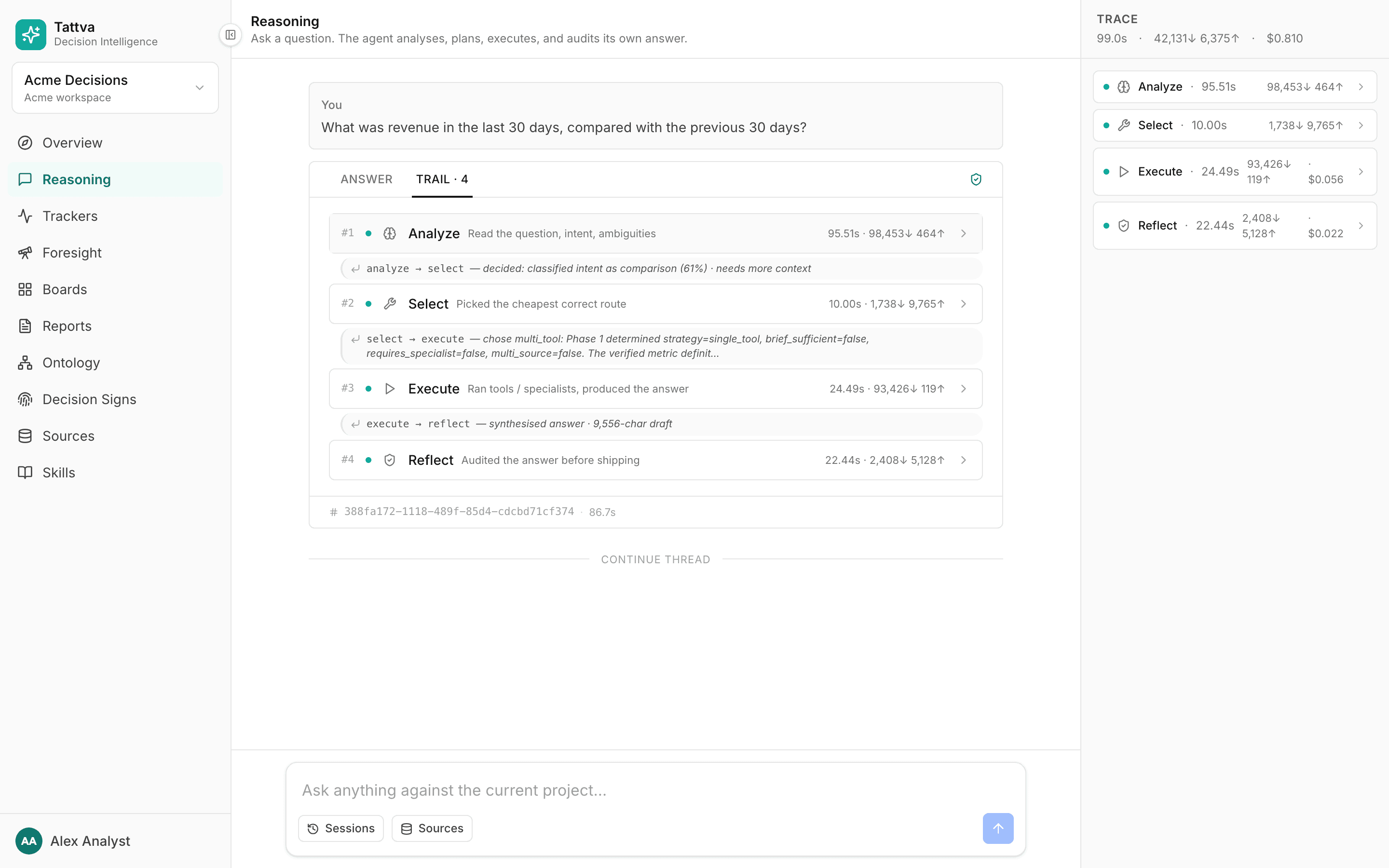
Open the Analyze card. Besides LLM calls, the Understanding summary (the analysis as raw JSON), prompt sent and Brief atoms (the context the agent had), it holds three blocks for your metrics, in this order.
Metric family
Present when the question used a family word. It shows the family, what happened, and the variants:
- "showed every variant", "asked which variant", "used the variant you chose" or "used the default variant"
- For a default, a note such as
"Revenue" is reported as Gross revenue (gross_revenue), the default; also defined: … Variants: …and, if the list of metrics changed,Metrics: … → …- For a default, when the other variants were computed,
Also computed, for one sentence beside the default: …
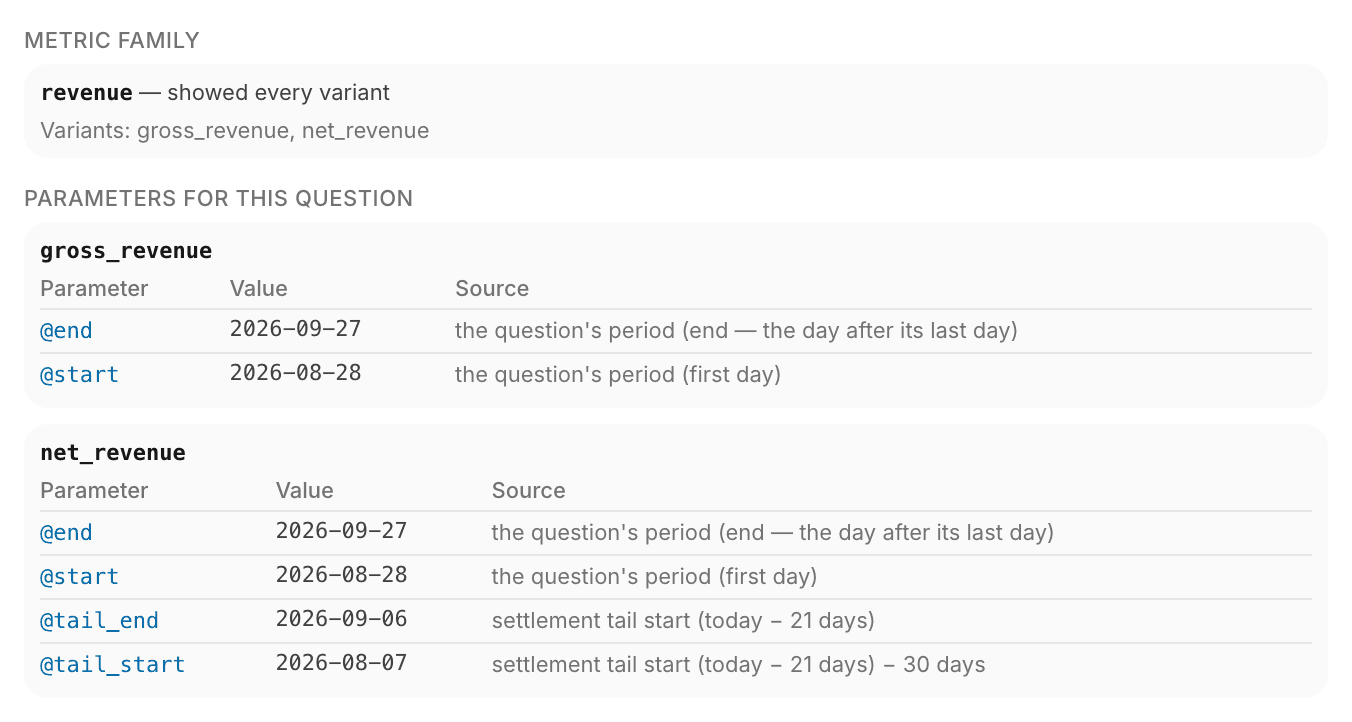
Parameters for this question
A table of Parameter, Value and Source for every input of every stored definition the question uses. The Source column says where the value came from:
| Source | Meaning |
|---|---|
| the question's period (first day) | The start of the period in the question |
| the question's period (end — the day after its last day) | The exclusive end of the period |
| window end + 90 days, settlement tail start (today − 21 days) … | A derived date, and what it was derived from |
| named in the question | A value, or a grouped label, found in the question's words |
| from the question | A filter the analysis read from the question |
| you answered | Your answer to a clarification |
| default | The definition's default value |
| …; value mapping 'Warehouse 1 → …' | A grouped label widened to its raw values |
Missing: @name in amber means an input had no value. The answer must say it is needed rather than guess it.
Compute
One card per run. This is the figure the answer must use.
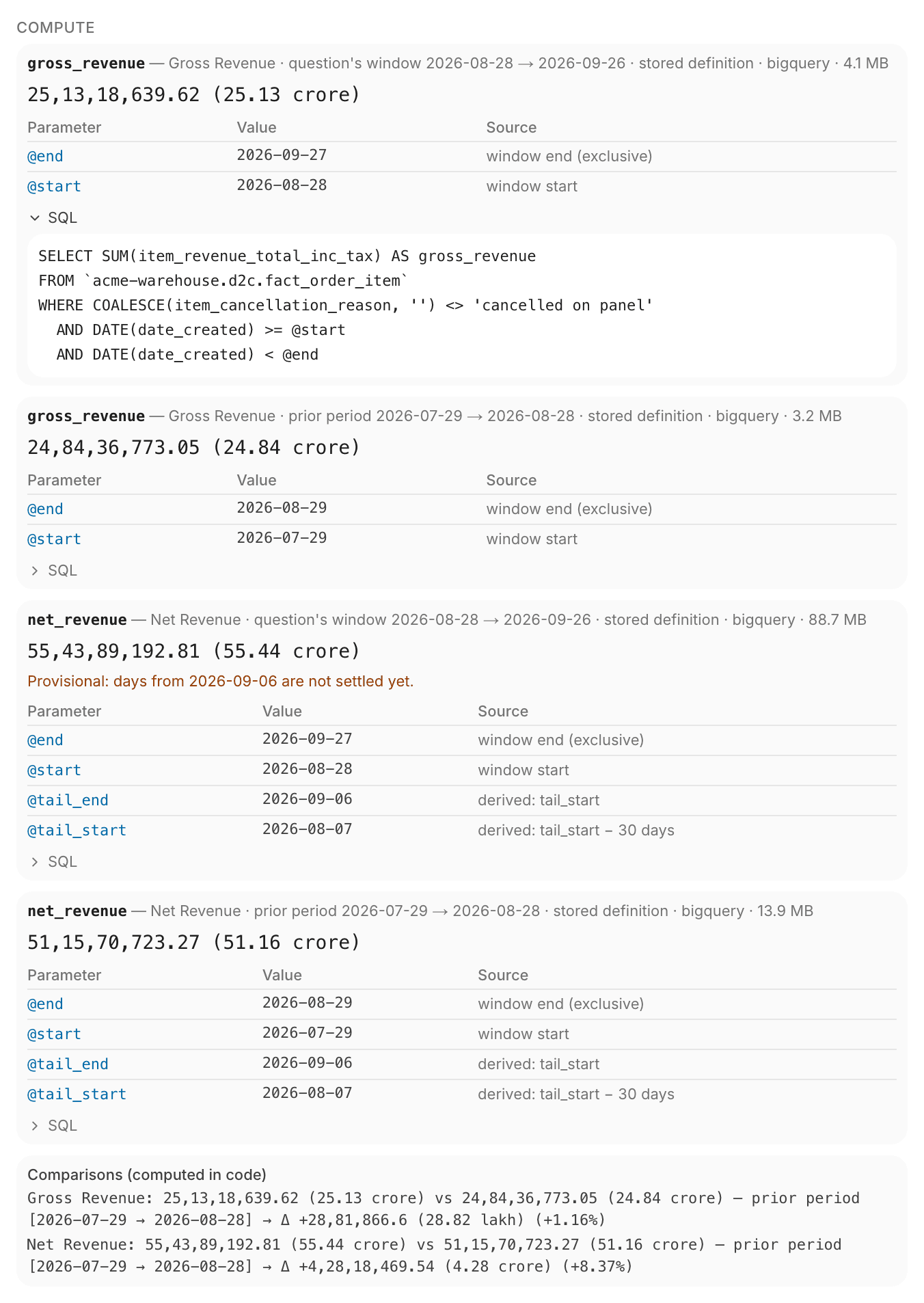
Field by field, top to bottom:
- Header. The metric, any breakdown (
by …), the run's role (question's window, prior period, same period last year, stored target), the dates (YYYY-MM-DD → YYYY-MM-DD, last day included), "other variant of the family, stated beside the default" for a family's other variant, where it came from (stored definition or compiled fragment), the engine and the data scanned. - Refused, when code could not compute it:
Refused: <reason> — the answer computes this with its own SQL, labelled as such.For a definition that returns one row per key, the agent is told instead to narrow its rows withrunMetricfilters, which run the stored query in code; it never re-types the stored SQL for a subset of rows. For a family's other variant it reads— the answer names this variant without a figure.Typical reasons: the definition returns one total and "declares no breakdown by …", an input is missing, or "cannot join across engines — compute each and combine". - Value. A single number, or the first rows of a table. The agent itself gets up to 200 rows of a table: in the query's own
ORDER BYif it has one, otherwise sorted by the value, highest first. Past 200 rows it gets the 200 highest and is told the list is not complete. When the question names particular products (or other values of the metric's key), by name or as a top N by another metric code computed ("top 5 by net revenue"), the agent gets only their rows and is told which and why; the metric that ranks them keeps every row. Several values of one column ("Doctor and HCT spend") are one list: the rows of each are kept, and a parameter on that column gets all of them. A product named in the question picks that product's row from a definition that returns one row per product, so the definition needs no product parameter. Which key a named value belongs to is read from the definition's own SQL: the question's column must be the key column itself, or the one column the key is computed from (m.Universal_Product_Name AS product, orIFNULL(m.Universal_Product_Name, 'Not in product master') AS product). In aCASE, only the columns itsTHENandELSEresults return count, not the ones itsWHENconditions test:CASE WHEN m.UC_SKU_Code IS NULL THEN 'Not in product master' ELSE m.New_Therapy END AS therapyis computed from New_Therapy. A key whose value comes from two columns is narrowed by its own name only. A filter on any other column the definition's rows carry (product_pnl'sproduct_family, say) narrows the rows by that column after the query; when the rows have no such column, every row is kept with a note saying the filter was not applied. Only a definition that returns one total refuses such a filter, because a total cannot be narrowed. A name is matched exactly first (ignoring capitals and spaces), else by its words: every word of the asked name must be a whole word of the row's value, so "shilajit gold resin" finds KAPIVA SHILAJIT GOLD RESIN, with a note. When a name matches several rows ("Shilajit Gold" names the resin, the capsules and the coffee mix), all of them are kept and marked ambiguous: a project convention that says which one is meant decides, otherwise the answer asks you to choose. It never adds them up or picks one silently. A name found in no row is refused as not found, never reported as zero sales. The agent's ownrunMetriccalls narrow the same way and get only those rows. A breakdown by month is not run again when the definition's rows already hold the months, such as acohort_monthcolumn of month dates: those rows are the breakdown. A series by day or month that is still longer than 200 rows keeps whole series: every period of as many products as fit, never a series cut part-way. - Provisional or Incomplete notes (below).
- Filters: the filters applied to a formula metric.
- Parameter / Value / Source table: each input, the value the query ran with, and where it came from, in short form:
window start,window end (exclusive),derived: window_end + 90 daysorderived: tail_start − 30 daysfor a derived date,askedfor a value the question or your answer supplied,filter on <column>for a filter, ordefault. The Parameters block above says in more detail whether anaskedvalue was named in the question or answered by you. - Joins: the joins a formula metric used.
- Notes, for example
@warehouses: Warehouse 1 widened by value mappings to …. - SQL. Click it to show the exact query that ran.
Below the runs, the box Comparisons (computed in code) lists each comparison: current value, baseline, and the change with its percentage. For a comparison by key, it also lists the changes by product (or other key) and the top falls and rises, with each top N's total and share when the rows add up.
Provisional and incomplete
Two notes mean the figure will change. The answer must say so beside the figure.
- Provisional: days from
<date>are not settled yet. The metric settles N days after the period (for example returns take 21 days to show up), and the question's period reaches into days that have not settled. Settled days use actual figures; the unsettled tail is an estimate. The settlement is set on the metric; see Metrics in Make. When the answer says when the figure settles, it quotes dates computed in code: a day counts as settled N + 1 days after it, so with a 15-day settlement, 19 Sep settles on 5 Oct. - Incomplete: data needed until
<date>does not exist yet — the figure will change. The metric looks past the end of the period, for example a 90-day repeat window after a cohort, and that time has not passed. The figure is incomplete until the period's end plus N days.
Data that was being loaded
A warehouse is reloaded during the day, and a load can take several steps. Between them, a table can be half-updated for a few minutes. For example, a load that first rewrites recent orders and then fills in their purchase type leaves those orders without one for about two minutes, and a count that filters on purchase type comes out tens of thousands short.
Every BigQuery query an answer runs checks when the tables it reads were last changed, before and after it runs. If a table changed while the query ran, the query runs once more. The answer then ends with one of these notes:
- "
d2c.fact_orderwas updated at 12:45 IST; figures may reflect a data load in progress." A table the answer read had changed in the 10 minutes before it was read. Ask again a few minutes later to get figures from the finished load. - "… was updated at 12:45 IST while this answer was being computed; …" The table changed between the answer's queries, or while one ran. Figures read before and after the change may not agree.
- "… kept changing while a query was re-run; figures may mix two data loads." The table changed again while the query ran a second time.
On the agent's own queries, the same note appears on the query's result among the tool calls in the Execute card. No note means no table the answer read had changed in the 10 minutes before it was read, or its last change time could not be read. The 10 minutes is the default of the REASONING_LOAD_SETTLE_MINUTES setting.
Figures for past periods can still move slightly from one load to the next, when late changes to orders arrive (a return, a cancellation). That is new data rather than a load in progress: two answers an hour apart can differ by an order or a few hundred rupees, and both are right for the data they read.
Withdrawn attempts
When Reflect rejects an answer, the answer is revised or written again (see the flow above). Nothing is hidden. The Answer tab then shows a banner, "This answer was revised before it was shown", with See what was run (or See attempt N) and, where there is one, Why? The rejected attempt and its reason are in the Trail.
In the Trail, the rejected Execute card has a withdrawn badge and an amber box: Withdrawn by the self-audit: followed by the reason, then the withdrawn answer itself.
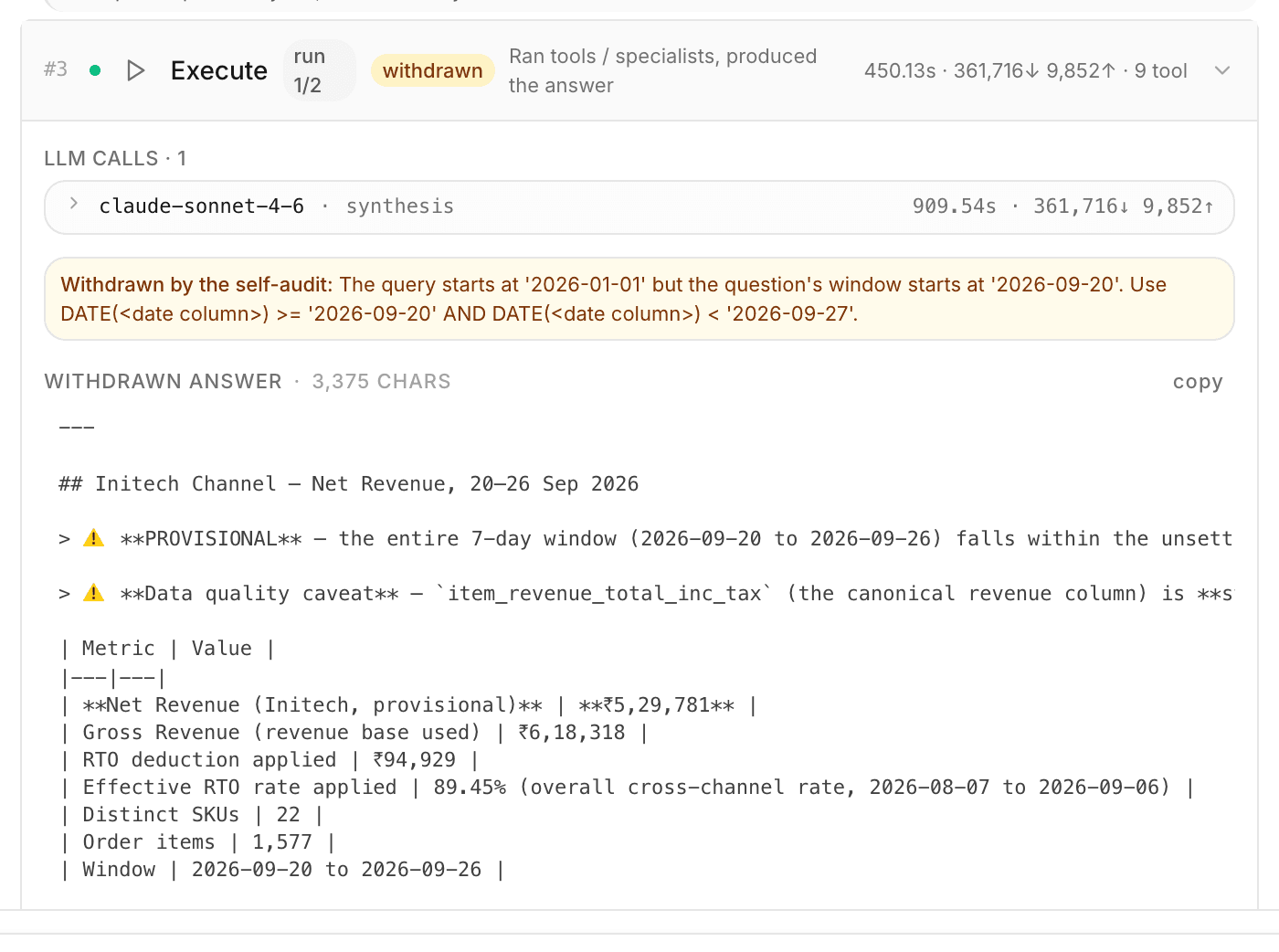
A withdrawn attempt means the checks worked. Read the final answer, and use the reason to see what the first attempt got wrong.
How to judge an answer
Trust the SQL in the Trail, not the prose.
- Open Trail, then Analyze.
- In Parameters for this question, check every value: the dates, the SKUs, the grouped labels. A wrong period or a missing warehouse explains most surprises. Relative periods ("last week", "last month") are turned into dates in code against today's date in Asia/Kolkata, leaving today out because it is a partial day; weeks run Monday to Sunday. The answer's closing Period: line names those dates, with weekday names for a period of up to seven days. Always read the dates.
- In Compute, check that the header says stored definition for the metrics you defined, and open SQL.
- Run the same period with Try it on the metric's Definition tab (see Metrics in Make), or run the SQL yourself. The two should match. Mind the end date: the Compute header shows the last day included (
2026-08-01 → 2026-08-31), but Try it's To (exclusive) is the day after. Copy@startand@endfrom the Compute card's Parameter table into From and To (exclusive). - Look for figures that are not in Compute. Every such figure comes from the agent's own SQL. Find that SQL among the tool calls in the Execute card and check it as you would a colleague's query.
- Read every ⓘ note at the end of the answer.
When an answer is wrong: what to fix
Fix the ontology, not the answer. The next question then comes out right too.
Users tell you an answer was wrong with Not satisfied under it: six quick reasons (figure looks wrong, definition is not what we use, wrong period, breakdown missing, wording unclear, other) and their own words. Each comment reaches owners, admins and ontology admins in the bell, and in Slack when the project has a webhook, and waits in Ontology › Maintain › Feedback. Open the answer's Trail from the comment, find the cause with the steps above and the table below, then make the fix with Create convention or Create correction. The comment moves to Fixed when the fix is accepted. See Work answer feedback. Satisfied is saved too, and counted on the Feedback page.
| Symptom | Fix |
|---|---|
| The SQL in Compute does not compute what you mean | The definition. Upload a new document with the corrected query and the same metric name, then accept the replacement. See Review queue |
| The answer used the wrong variant, or asked when it should not have | The family policy. See Families |
| A city or channel misses some raw values | The grouping. Group the raw values under the label. See Inputs and groupings |
| A formula metric was refused for a join, or joined the wrong table | The relationship. Add or correct a verified many-to-one link. See Knowledge graph |
| A breakdown was the agent's own SQL | Define a version of the metric that returns one row per that column. A note that the breakdown "does not add up to the computed total" compares the metric's own column of the agent's table (orders, order_count) with the total; a table with no such column, or a top N, is not checked. Rows that sum to more than the total are flagged only when they cannot overlap: the metric's query is a plain SUM, or code's own rows over the same values (Store, APP) added up to it. Customers by platform, where one customer can order on both, are not flagged. Rows that sum to less than the total are always flagged |
Trackers
Trackers compute through the same code. A tracker's series comes from the same stored definitions, with inputs bound, settlement applied and only verified joins. When code refuses a metric, the tracker records the reason instead of a number.
Each tracker question shows one state: Critical, Needs attention, All clear, Skipped (with the reason) or Not run yet.