Sensitive data
Mark sensitive columns, grant and revoke PII clearance, and understand what redaction does to profiles and answers.
You control two things. Each column has a sensitivity, and each member has a PII clearance tier. Tattva enforces the rest when it builds the ontology and when it answers. You do not write SQL filters for it.
Column sensitivity
Every column has a sensitivity. It says whether the column may be used, and whether its values may appear in an answer.
| Sensitivity | Effect shown in the editor |
|---|---|
public | "Values may be quoted freely in answers." |
internal | "Values may be used internally. Not for anything externally shared." |
pii | "Personal data. Aggregates stay available; individual values should not be quoted." |
restricted | "Most restrictive — treat individual values as not for display." |
excluded | "Never used in answers. The agent is not shown this column, and a query that reads it is refused before it runs. Say in Business meaning what to use instead — the refusal quotes it to the agent." |
The build suggests a sensitivity for each column. Check it, especially for columns holding emails, phone numbers, names, addresses or customer IDs. Under-tagging is the more common mistake. The build never suggests excluded: only you set it.
Columns that must not be used
Mark a column excluded when no answer may use it, for example an old mapping or a field you know is wrong. Writing "do not use this column" in its Business meaning is not enough: the meaning guides the agent but does not stop it. Put the replacement in the Business meaning, for example "For therapy always use New_Therapy from gsheets_integration.universal_meta_sku_code, joined on item_sku_code_uc equal to UC_SKU_Code."
With excluded set:
- The column is left out of the table list the agent writes its SQL from, and out of the source card it can look up.
- A query the agent writes that names the column is refused before it runs, whoever asks. The refusal tells the agent the column is excluded and quotes its Business meaning, so the agent rewrites the query with the replacement you named. A breakdown by the column (for example a metric grouped by it) is refused the same way.
- A query that names a column of the same name on another table, which is not excluded, still runs.
SELECT *on the table is not refused.- The build never turns the column into a metric or a glossary term.
This takes effect in the next question; no rebuild is needed.
Changing a column's sensitivity
You can change it in two places:
- Sources › a source › Schema. Click ✎ in the column's Meaning cell ("Edit meaning & role"), pick a Sensitivity, and click Save. This edits the source's own meaning, so every project that uses the source reads it.
- Ontology › Knowledge Graph › a source's drawer › Schema. Each column shows
sens: <value>. Click Override to change it for this project only. Remove override returns to the source's value. See Knowledge graph.
Takes effect at the next build
A saved change shows "Saved — but not in effect yet." Reasoning uses the last ontology build. Rebuild on Make › Data to put it to work. The exceptions read the sensitivity as saved: the query check below, so a column you mark pii is refused in the next question, and everything excluded does when answering (above).
What sensitivity changes
At build time:
- Columns marked
piiorrestrictedare never turned into metrics automatically. - Every metric and concept gets a class from the columns it touches: not personal data, raw personal data, a safe aggregate, or an unsafe aggregate (one grouped by identifying columns, or over too few rows).
- Column profiles keep no real values for personal data. A text column whose name looks like personal data (email, phone, name, address, customer ID and similar), or that is marked
piiorrestrictedin any project, gets no common values, and its minimum and maximum are left blank. BigQuery columns with a policy tag are not profiled at all. See Inputs and groupings.
The missing common values have a visible effect: when an answer needs a value for such a column, the clarification has no clickable choices. The user types the value.
When answering:
- Queries that read personal data are refused before they run. If a query the agent writes reads a column marked
piiand the asker's clearance doesn't cover it, Tattva refuses the query. It never reaches BigQuery or the file data. Reading, filtering, grouping or joining on apiicolumn needs Full clearance. Counting its distinct values (COUNT(DISTINCT billing_email)) needs Aggregated, or Unsafe aggregates when the column has fewer than 5 distinct values or no profile.SELECT *on a table counts as reading everypiicolumn in it. Columns markedrestrictedare not refused here. - The answer then says the data is protected, answers with what isn't personal data (for example the order number and date), and says where to ask for access: the route your PII convention names (for example "reach out to the DA team"), or, if none, that a workspace owner or admin grants PII clearance. It doesn't suggest changing BigQuery, IAM or service-account permissions, also when BigQuery itself withholds a policy-tagged column.
- An answer that refuses because of a project convention, such as a PII policy that forbids showing personal data for any individual customer, says the data is protected here and offers what can be shown instead, such as grouped counts. Where to ask for access is set by your convention, for example "For PII access, reach out to the DA team". No refusal invents another route, such as a CRM, order management system, support ticket or another database.
PII clearance tiers
Each workspace member has one PII clearance tier. The default is none.
| Tier (as offered in the modal) | What the member gets |
|---|---|
| None — no PII visibility | The default. Small groups are suppressed (below) and emails, phone numbers and card numbers are scrubbed from answers |
| Aggregated — safe aggregates only (HAVING ≥ K) | Safe aggregates. Small groups still suppressed, answers still scrubbed |
| Unsafe aggregates — low-cardinality aggregates allowed | Aggregates grouped by identifying columns. Small groups still suppressed; no scrubbing |
| Full — sees raw PII and unfiltered aggregates | Everything, with no suppression and no scrubbing. For HR, legal or compliance roles |
Clearance and role are separate. A viewer with Full sees personal data; an admin with None does not. Set both as your privacy policy requires.
Granting and revoking clearance
Only a workspace owner or admin can change clearance. Others get "only workspace owner/admin can manage PII clearance".
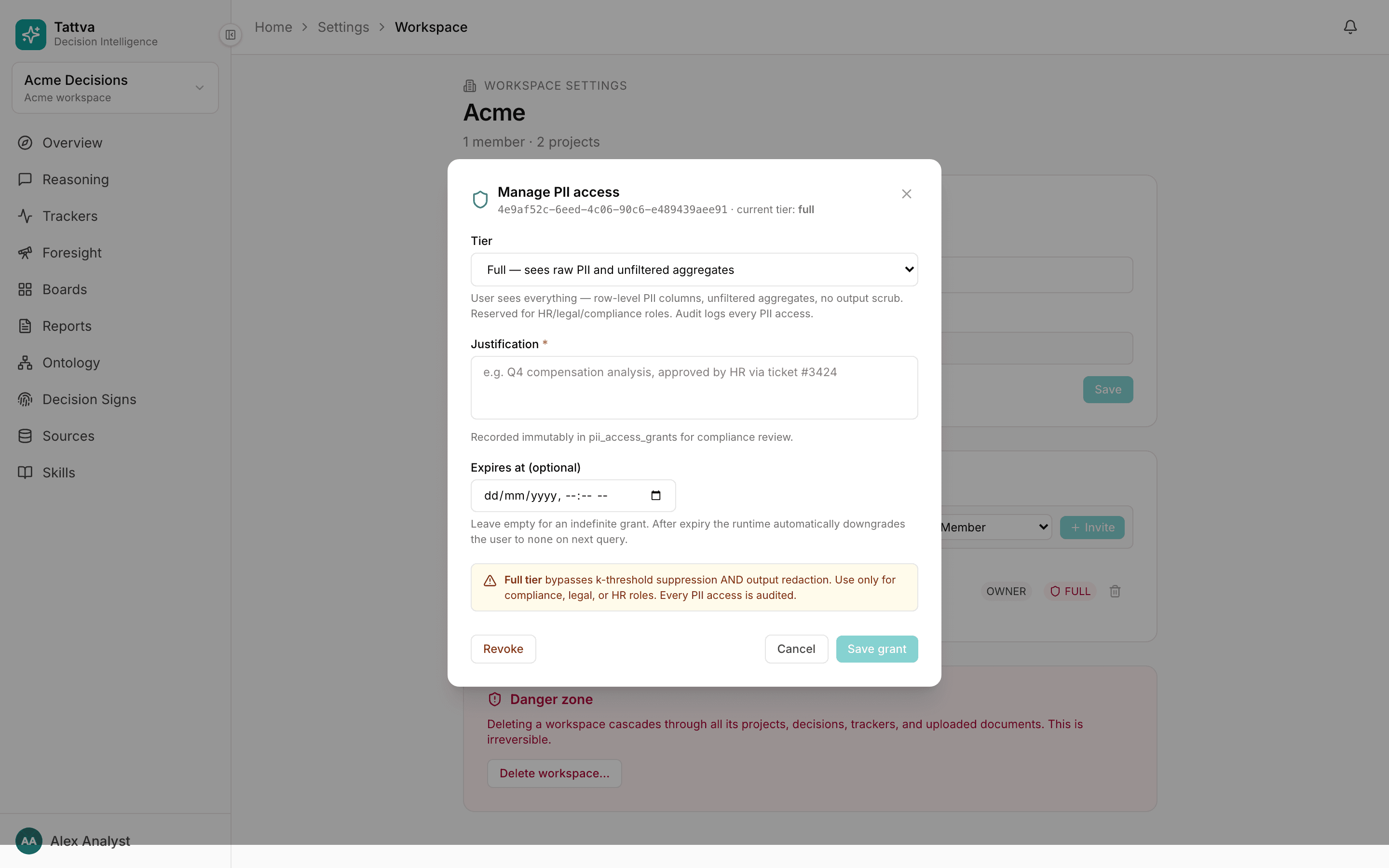
Open Settings › Workspace. In Members, each row has a tier chip next to the role (NONE, AGGREGATED, UNSAFE AGG or FULL).
Click the chip. The Manage PII access modal opens, naming the member by name and email and their current tier.
Pick a Tier. The modal describes what that tier sees.
Write a Justification of at least 5 characters, for example the approval ticket. It is kept for compliance review.
Optionally set Expires at (optional) for a time-bound grant.
Click Save grant.
To revoke, open the modal for a member whose tier is not none and click Revoke. Confirm Revoke PII access? The tier returns to none at once. The grant is kept, marked revoked, so the history stays.
The member list can lag an expired grant
Answers stop using a grant once its Expires at passes: the member goes back to the tier they had before it. The chip in Members keeps showing the granted tier until the next change. Revoke if you want the list to say so.
What redaction looks like
There is no badge or banner. You see the effect in the answer itself:
- Scrubbed text. For members on None or Aggregated, emails, phone numbers, card-like numbers and Aadhaar numbers in the final answer are replaced by tokens such as
[redacted:emails]or[redacted:phones]. - Suppressed rows. For every tier except Full, an aggregate query the agent runs on BigQuery drops groups with fewer than 5 rows (the workspace's K). A breakdown can therefore show fewer rows than the data has, and a total over very few rows can come back empty. Nothing marks the missing rows.
- Refused queries. When a question needs a
piicolumn the member's tier doesn't cover, the answer says that data is protected and gives what it can without it.
If a number seems too low for someone on a low tier, compare it with the same question asked by a Full member, or check the tier first.
Audit events
Grants and revocations are recorded. Open Settings › Audit log (workspace owners only). Filter All actions down to pii.grant or pii.revoke. Each row shows when, who, the member affected, and details such as the previous tier.
The per-answer events (scrubbing, row suppression and refused queries) are logged too, but not shown in the app. Ask your engineering team if you need them.